Vinyl Shirt Printing: HTV & Cricut Guide
Vinyl shirt printing uses heat transfer vinyl (HTV) — a heat-activated material you cut into shapes, weed, and press onto fabric with heat. With an affordable cutting machine like a Cricut and a household iron or heat press, you can make durable, professional-looking custom shirts at home for names, numbers, logos, and bold graphics.
This guide walks through the full HTV workflow, the correct press settings for every vinyl type, how to layer multiple colors, and when vinyl beats other DIY methods.
What is heat transfer vinyl?
HTV (also called iron-on vinyl) is a thin, colored polyurethane film on a clear plastic carrier sheet. A cutting machine cuts your design into the vinyl; you remove the excess ("weeding"); and heat activates an adhesive on the back so the vinyl bonds to the shirt. Because you work with solid sheets of color, vinyl produces crisp, opaque graphics — ideal for text and simple shapes, less so for photographs.
Unlike screen printing or DTG, vinyl needs almost no specialized equipment beyond a cutter and a heat source, which makes it the go-to method for hobbyists and small custom orders.
The vinyl shirt printing process, step by step
Every HTV project follows the same five moves. Miss the first one — mirroring — and the whole design comes out backwards.
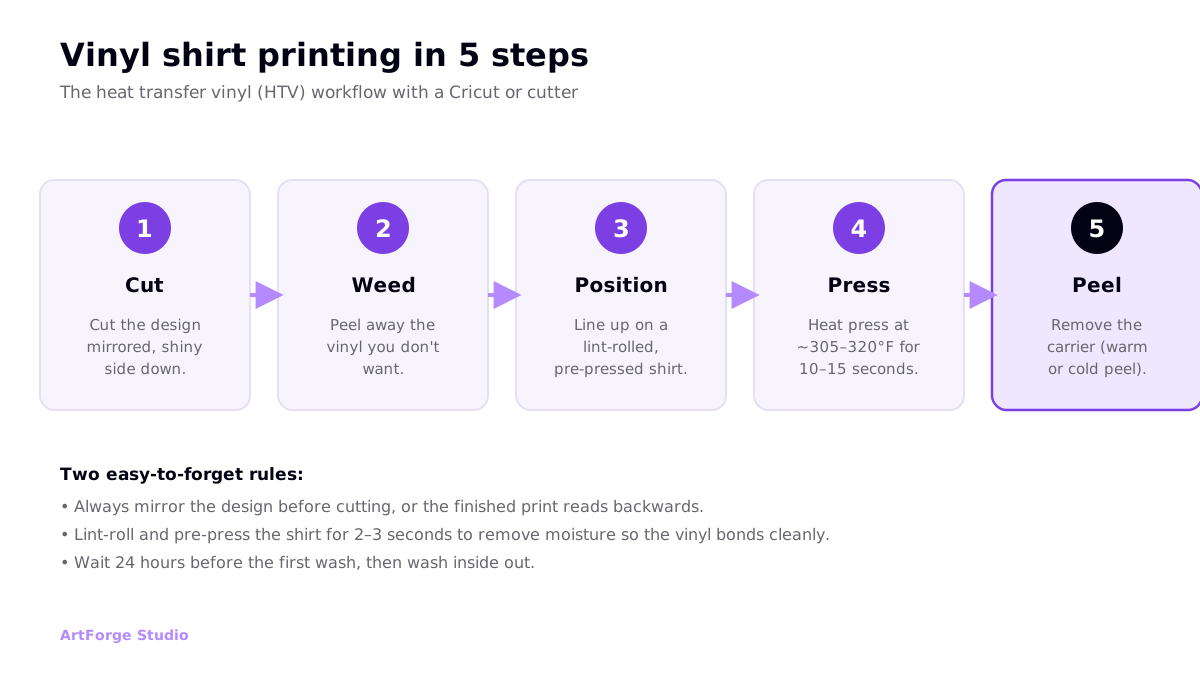
- Cut. Load HTV into your cutter with the shiny carrier side down, and mirror the design in your software before cutting.
- Weed. Peel away all the vinyl that is not part of your design, leaving only the artwork stuck to the carrier sheet.
- Position. Lint-roll the shirt, pre-press it for 2–3 seconds to remove moisture, then line up the design.
- Press. Apply heat and firm pressure at the correct temperature and time (see settings below).
- Peel. Remove the carrier sheet — warm or cold depending on the vinyl — and give it a final press through parchment.
Wait 24 hours before the first wash, and always wash the finished shirt inside out to protect the print.
HTV types and press settings
Not all heat transfer vinyl behaves the same. Specialty finishes need different temperatures, press times, and peel methods, and some must always be the top layer. These are typical starting points as of 2026 — always confirm the exact numbers on your vinyl brand's spec sheet, because Siser, Cricut, and other makers vary.
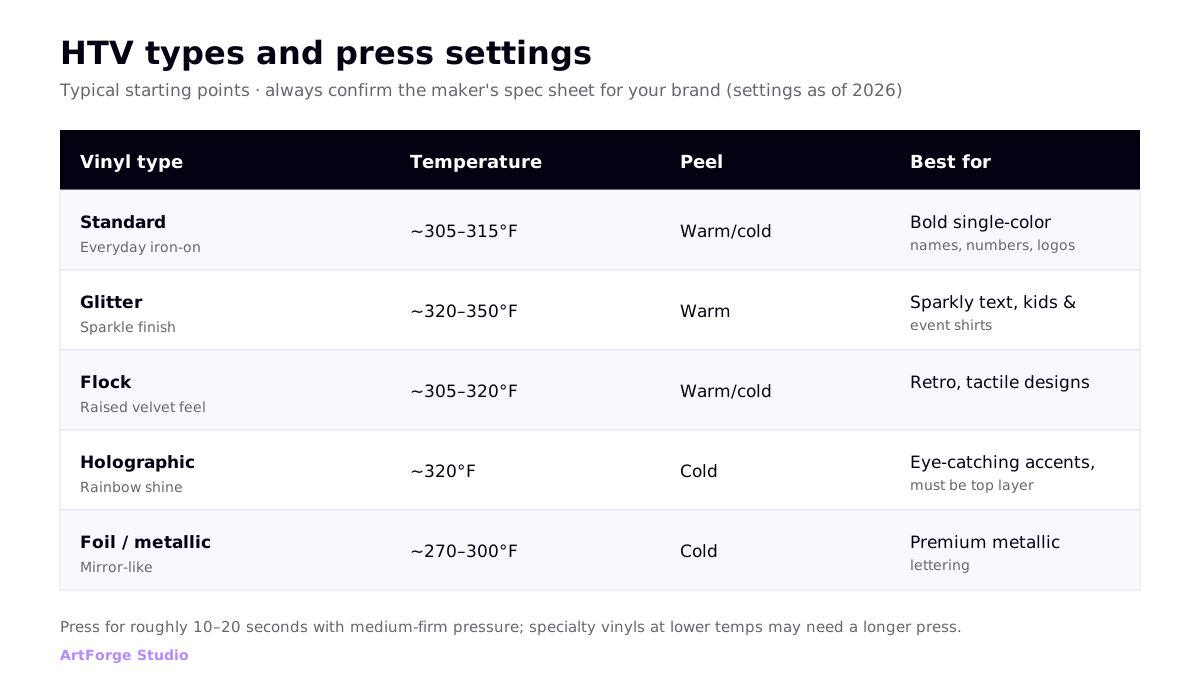
| Vinyl type | Typical temp | Peel | Notes |
|---|---|---|---|
| Standard | ~305–315°F | Warm or cold | The everyday workhorse for text and single-color graphics |
| Glitter | ~320–350°F | Warm | Runs hotter; must be the final layer in a stack |
| Flock | ~305–320°F | Warm or cold | Raised, velvety texture; keep humidity low in storage |
| Holographic | ~320°F | Cold | Rainbow shine; apply as the top layer only |
| Foil / metallic | ~270–300°F | Cold | Lower heat; mirror-like finish for premium lettering |
As a rule, press for 10–20 seconds with medium-firm pressure. When a specialty vinyl uses a lower temperature, extend the press time a little to compensate.
Layering multiple colors
Multi-color vinyl designs are built one layer at a time, from the bottom color up. The trick is not to fully press every layer — over-pressing lower layers repeatedly can distort them.
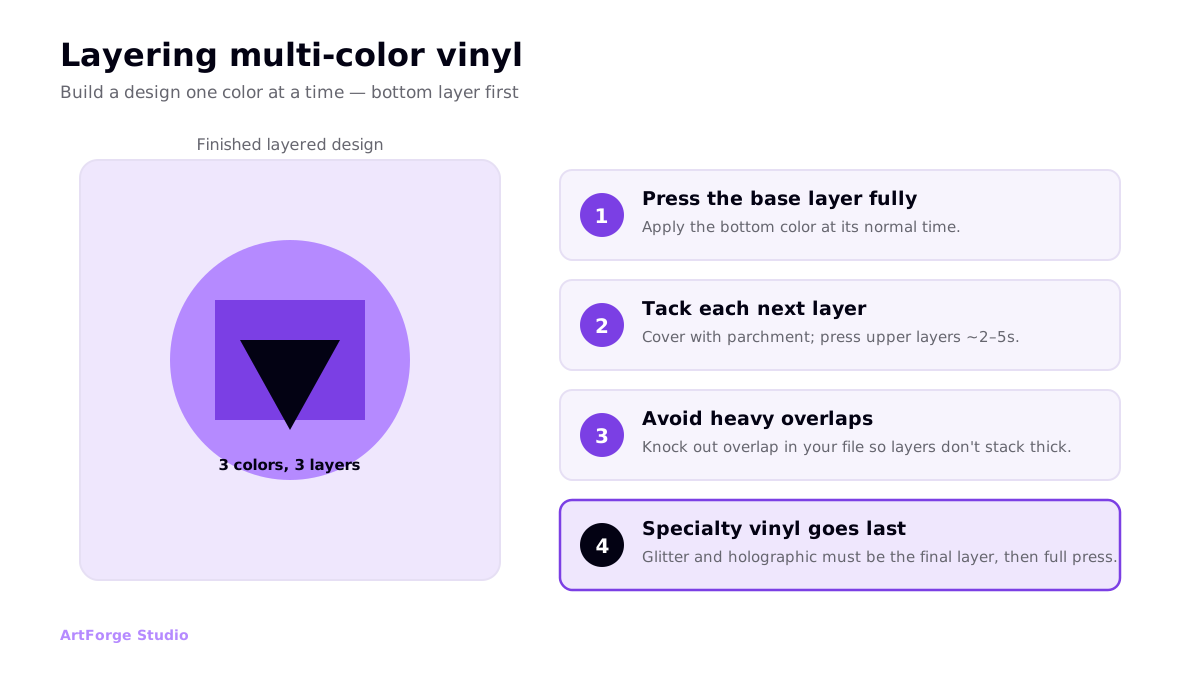
- Base layer first: press the bottom color for its full time.
- Tack upper layers: cover with parchment and press each additional layer for only 2–5 seconds until all layers are on.
- Knock out overlaps: in your design software, remove overlapping vinyl so layers butt against each other rather than stacking thick.
- Specialty last: glitter and holographic vinyl must be the final layer, then do a full final press.
Vinyl vs other shirt printing methods
Vinyl occupies a specific niche: fast, cheap, and durable for simple custom pieces. It is not built for full-color art or big production runs.
| Method | Vinyl (HTV) wins when... | Consider instead when... |
|---|---|---|
| vs DTF | You want solid single colors, names, numbers | You need full-color or gradient artwork |
| vs screen printing | You need a handful of shirts, no minimum | You are printing 50+ identical shirts |
| vs DTG | You want a bold, opaque, tactile finish | You want soft-hand photo-realistic prints |
Because your artwork is cut, not printed, vinyl works from clean vector files (SVGs) rather than photos. If you need cut-ready files, see our guide to SVG t-shirt designs and where to get them. Vinyl is also one of the most beginner-friendly options if you are just starting out with t-shirt printing at home.
What you need to start vinyl shirt printing
One of the reasons vinyl is so popular with beginners is the short shopping list. To make your first shirt you need:
- A cutting machine. A desktop cutter such as a Cricut or Silhouette cuts your design from the vinyl sheet. Entry-level machines are affordable and beginner-friendly.
- Heat transfer vinyl. Buy the finish that matches your design — standard for most work, or a specialty vinyl for texture and shine.
- A weeding tool. A small hook for peeling away excess vinyl cleanly, especially inside tight letters.
- A heat source. A heat press gives the most consistent results, but a household iron works for small designs.
- Parchment or a Teflon sheet. To protect both the vinyl and the heat plate during pressing.
- Blank shirts. Cotton and cotton-rich blends take HTV well; grab a few extras to practice on.
That modest kit is why vinyl is often the first method people try when experimenting with t-shirt printing at home — the barrier to a first finished shirt is genuinely low.
Tips for cleaner vinyl prints
- Lint-roll and pre-press. A few stray fibers or a little moisture will keep vinyl from bonding cleanly.
- Use firm pressure on a hard surface. A padded ironing board absorbs pressure; a heat press or a firm surface gives an even bond.
- Cover with parchment or Teflon. This protects both the vinyl and your heat plate.
- Match the peel type. Peeling a cold-peel vinyl while warm can lift the design; check the spec.
- Test on a scrap. Different fabrics and vinyls interact differently — a quick test saves a ruined shirt.
Frequently asked questions
Do you mirror vinyl designs before cutting?
Yes. Heat transfer vinyl must always be mirrored (flipped horizontally) before cutting, because you cut it shiny carrier-side down and then flip it over to press. If you forget to mirror, text and any directional artwork will read backwards on the shirt.
What temperature do you press heat transfer vinyl?
Standard HTV presses at roughly 305 to 315 degrees Fahrenheit for 10 to 15 seconds with medium-firm pressure. Specialty vinyls differ: glitter runs hotter at about 320 to 350 degrees, holographic around 320, and foil or metallic lower at about 270 to 300. Always confirm the exact spec sheet for your vinyl brand.
Can you use a household iron instead of a heat press?
Yes for small, simple designs, though a heat press gives far more consistent results. With an iron, use the highest cotton setting with no steam, apply firm pressure on a hard surface (not a padded ironing board), and press in sections for a bit longer than a heat press would. Cover the vinyl with parchment or a Teflon sheet.
How long does vinyl on a shirt last?
Properly applied HTV commonly survives around 50 washes before edges start to lift or crack. Longevity depends on a clean application: lint-roll and pre-press the shirt, apply firm even pressure, wait 24 hours before the first wash, then wash inside out in cold water and avoid high-heat drying.
Is vinyl printing good for selling shirts?
Vinyl is excellent for personalized one-offs and small custom orders such as names, numbers, and simple graphics, because it needs no minimum and little upfront cost. It is less suited to full-color art or high-volume production, where DTG, DTF, or screen printing scale better.