Best AI Image Generators for Print on Demand (2026 Compared)
Most "best AI generator" lists rank tools by how pretty the images are. For print on demand, that is the wrong question. A gorgeous image that ships at 1024 pixels with a baked-in background and no commercial license is useless to a seller. What matters is the distance from prompt to sellable product.
Full disclosure up front: we build ArtForge, one of the tools in this comparison. We have kept the assessment honest — including where competitors beat us — because this article is only useful to you if it is true.
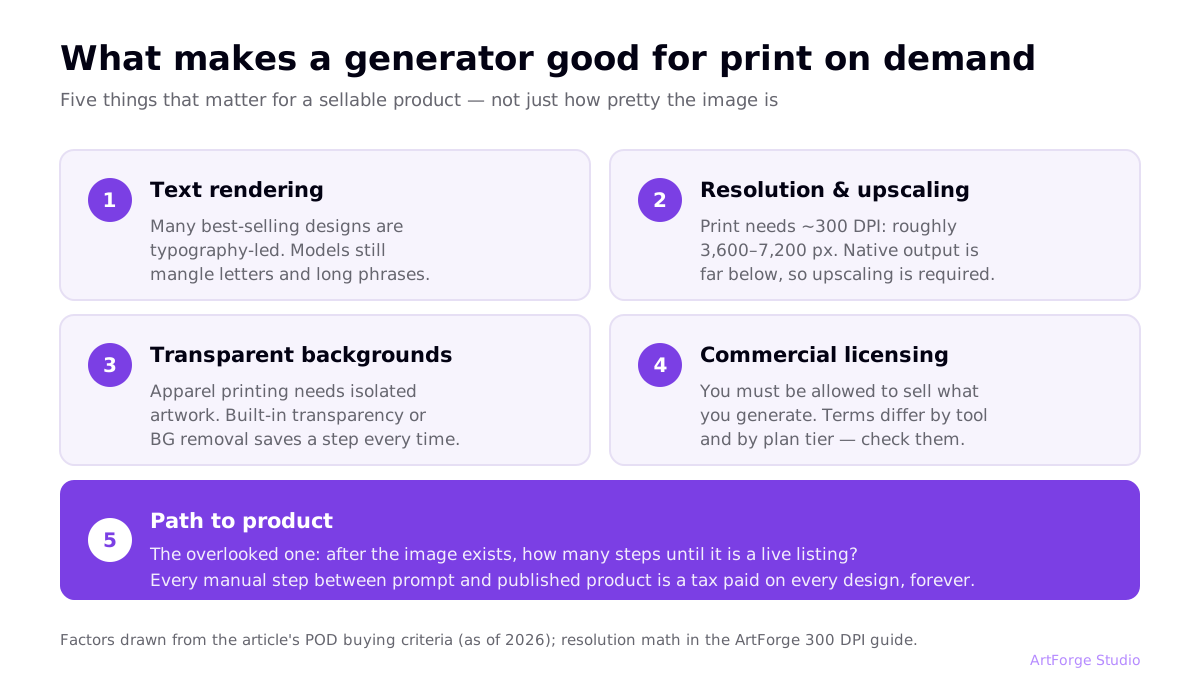
What actually matters for POD (not just image quality)
- Text rendering. A large share of best-selling POD designs are typography-led ("World's Okayest Golfer"). Many models still mangle letters.
- Resolution & upscaling. Print needs roughly 300 DPI at physical size — 3,600–7,200 px for common products. Native output from most models is far below that. (Full math in our 300 DPI guide.)
- Transparent backgrounds. Apparel printing needs isolated artwork; a tool that outputs transparency (or removes backgrounds automatically) saves a step on every single design.
- Commercial licensing. You must be allowed to sell what you generate. Terms differ by tool and plan tier.
- Path to product. The overlooked one: after the image exists, how many steps until it is a live Printify/Printful/Gelato listing?
The comparison table
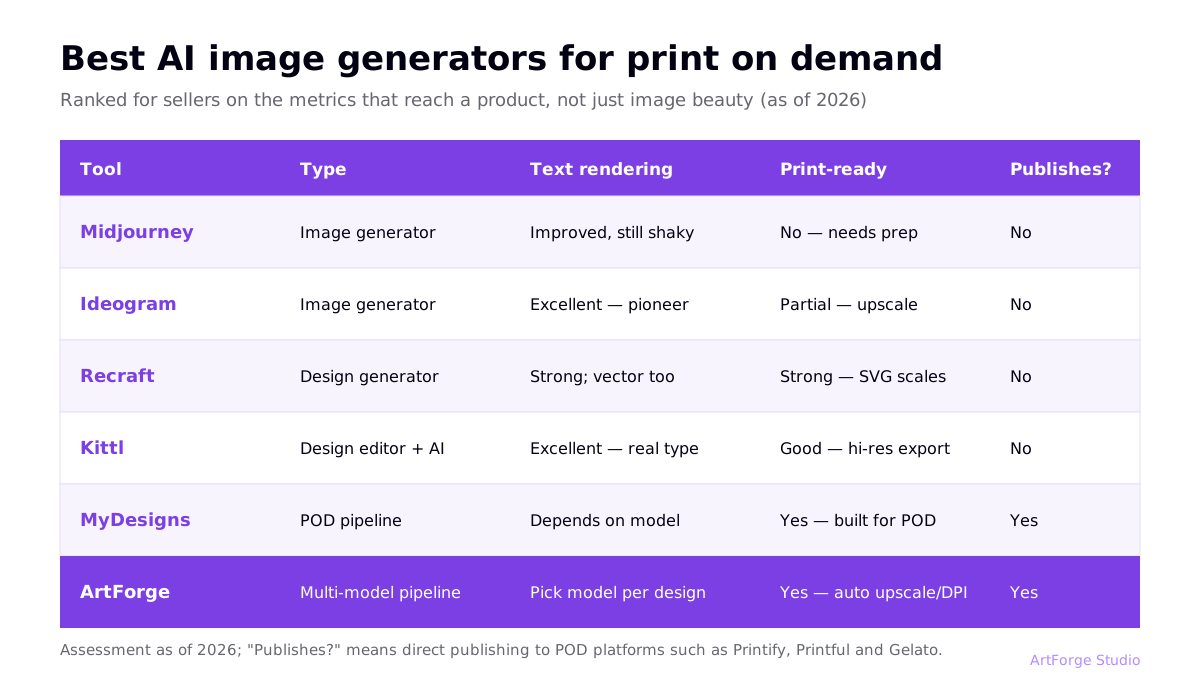
| Tool | Type | Text rendering | Print-ready output | Publishes to POD? | Entry price |
|---|---|---|---|---|---|
| Midjourney | Image generator | Improved, still unreliable for long phrases | No — needs upscale + background removal | No | From ~$10/mo |
| Ideogram | Image generator | Excellent — a text-rendering pioneer | Partial — upscaling still usually needed | No | Free tier; paid from ~$8/mo |
| Recraft | Design-focused generator | Strong; vector output is its superpower | Strong — SVG scales infinitely | No | Free tier; paid from ~$12/mo |
| Kittl | Design editor + AI | Excellent (real typography tools) | Good — high-res export on paid plans | No direct publishing | Free tier; paid from ~$10/mo |
| MyDesigns | POD pipeline platform | Depends on model used | Yes — built for POD | Yes | Free tier; paid plans vary |
| ArtForge | Multi-model POD pipeline | Depends on model — pick per design | Yes — automatic upscale, BG removal, DPI | Yes — Printify, Printful, Gelato | See pricing |
Prices are approximate entry points as of writing and change often — check each vendor.
Tool-by-tool: the honest version
Midjourney — best raw aesthetics, worst workflow fit
Midjourney still produces some of the most striking imagery of any model, and for illustration-led niches (fantasy posters, vintage art prints) it is a legitimate weapon. The POD problems are practical: output resolution needs upscaling for large prints, there is no transparent background output, text rendering remains hit-and-miss, and there is no route to a product — every design must be exported and processed elsewhere. We wrote a dedicated walkthrough of that process in Midjourney to Printify. Also check current commercial terms — usage rights come with paid plans and have had revenue-based conditions for larger companies.
Ideogram — the typography specialist
Ideogram made its name doing the one thing everyone else failed at: rendering words correctly. For quote-based designs, badges, and logo-style graphics, it is often the fastest way to a clean result. Weaknesses: like Midjourney, it stops at the image — preparation and publishing are your problem — and its illustration style range, while good, is narrower than Midjourney's at the artistic extremes.
Recraft — vectors change the resolution game
Recraft's standout feature is native vector (SVG) generation. Vectors scale to any print size with zero quality loss, which sidesteps the entire upscaling problem for flat, graphic-style designs. It also handles text well and offers style consistency controls. Where it fits less well: painterly or photographic styles, and — again — no publishing pipeline. For sticker and logo-style sellers, Recraft deserves a serious look.
Kittl — a real design tool with AI bolted in
Kittl is closer to "Illustrator for non-designers" than to a pure generator: professional typography, templates, vector editing, plus AI generation inside the editor. If you enjoy hands-on design work, it is genuinely good software. The limitation is scope: when the design is done, you still export files and handle print prep, listings, and publishing in other tools. We compared the options for closing that gap in 7 Kittl alternatives.
MyDesigns — the pipeline competitor
MyDesigns is the closest philosophical cousin to ArtForge: it treats POD as a pipeline, with generation, bulk tools, and publishing integrations under one roof. It is feature-dense and capable — genuinely worth evaluating. Trade-offs we hear from switchers: the interface has a steep learning curve, and the feature sprawl can feel heavy if you mainly want prompt-to-product speed.
ArtForge — multi-model generation plus the full pipeline
ArtForge's bet is different from single-model tools: no one model wins every niche, so ArtForge gives you multiple state-of-the-art models behind one prompt box, then handles everything after generation — automatic upscaling, background removal, print-ready formatting, SEO title/tag/description generation, and direct publishing to Printify, Printful, and Gelato. Honest limits: it is not a hands-on vector editor like Kittl, and if you only ever need raw images with no products at the end, a plain generator subscription may be cheaper.
Which should you pick? By use case
| You are… | Best fit | Why |
|---|---|---|
| An artist selling illustration prints | Midjourney (+ upscaler) | Peak aesthetics; workflow overhead acceptable at low volume |
| Selling quote/typography designs | Ideogram or Kittl | Reliable lettering; Kittl adds manual type control |
| Making stickers, badges, logo-style art | Recraft | Vector output eliminates resolution issues |
| Running a volume POD business | ArtForge or MyDesigns | Generation-to-listing speed beats per-image quality differences at scale |
| Brand new, testing the waters | ArtForge | One tool to learn; the whole loop from prompt to listing (see the starter guide) |
Run your own bake-off (an afternoon, not a month)
Tool reviews — including this one — are generalizations. Your niche is specific. Before committing to an annual plan anywhere, run a controlled test:
- Pick 3 prompts that represent your actual catalog — say, one illustration design, one text-led design, one badge/emblem.
- Run all 3 on each candidate tool's free tier or cheapest month. Same prompts, minimal per-tool tweaking.
- Judge on printability, not screen beauty: does text render correctly? How much cleanup does the background need? How does it look after upscaling to shirt-print size at 100% zoom?
- Time the full journey from prompt to a listing you would actually publish — including every export, upload, and rewrite. This number, multiplied by your monthly design target, is the real cost of each tool.
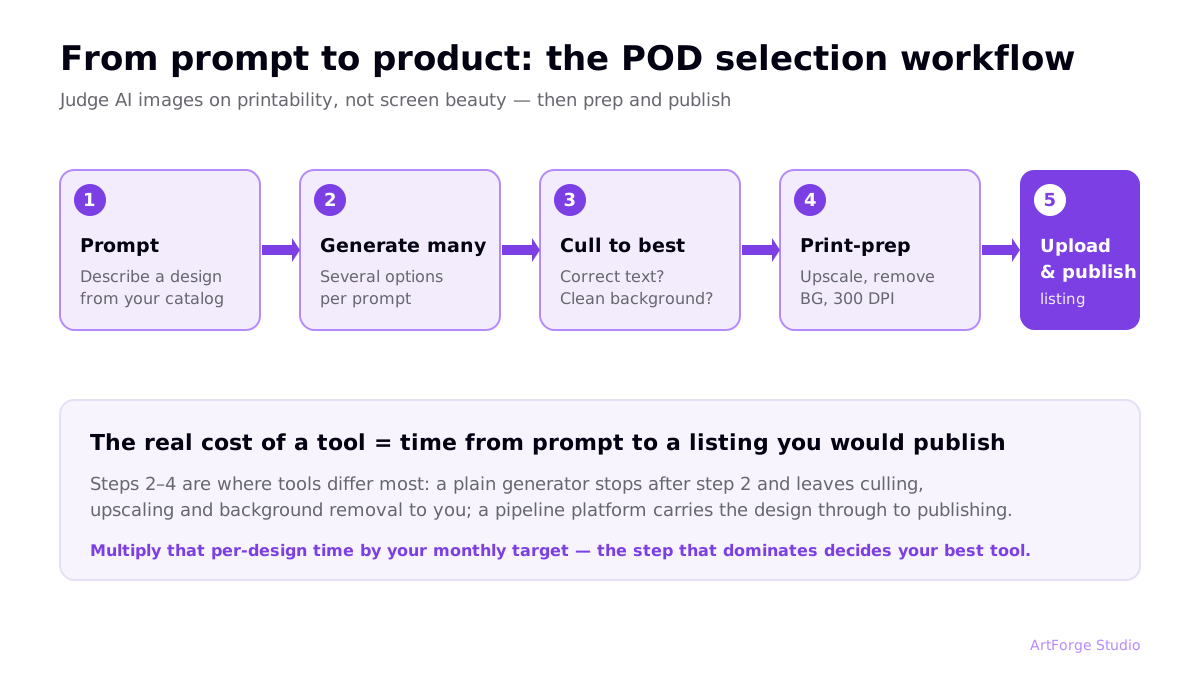
Most sellers who run this test discover the ranking that matters to them differs from any published list — usually because one step (text rendering, background cleanup, publishing) dominates their particular workflow.
The bottom line
If you compare tools on image beauty alone, Midjourney probably still wins. But POD sellers do not sell images — they sell products, and every manual step between prompt and listing is a tax paid on every design, forever. Specialists (Ideogram for text, Recraft for vectors) earn their place for specific niches. For running an actual business at volume, the pipeline tools win on the metric that compounds: listings published per hour of your life. That argument, with the timing breakdown, is in our automation guide.
FAQ
Which AI image generator is best for t-shirt designs?
For pure illustration quality, Midjourney remains a favorite. For designs that include text — the majority of best-selling t-shirts — Ideogram and Recraft render typography far more reliably. If you want to go from prompt to published product without leaving one tool, a pipeline platform like ArtForge or MyDesigns is the practical choice.
Can I legally sell products made with AI images?
Generally yes — most major generators grant commercial usage rights to paying subscribers, and POD platforms accept AI artwork. Check each tool's current terms (some have revenue-based clauses), avoid trademarked content in prompts, and note that purely AI-generated images may have limited copyright protection in some jurisdictions.
Are AI images high enough resolution for printing?
Not straight out of the generator, usually. Most models output roughly 1–2K pixels on the long edge, while a large print area at 300 DPI needs 3,600–7,200 pixels. You need an upscaling step — either a separate AI upscaler or a tool with built-in print-ready processing.
Do I need more than one AI generator for POD?
Different models genuinely have different strengths — one may excel at vintage illustration while another handles lettering better. That is why multi-model platforms are attractive: you pick the model per design instead of paying for several subscriptions.