Print-on-Demand Automation: From Design to Listing in 6 Minutes
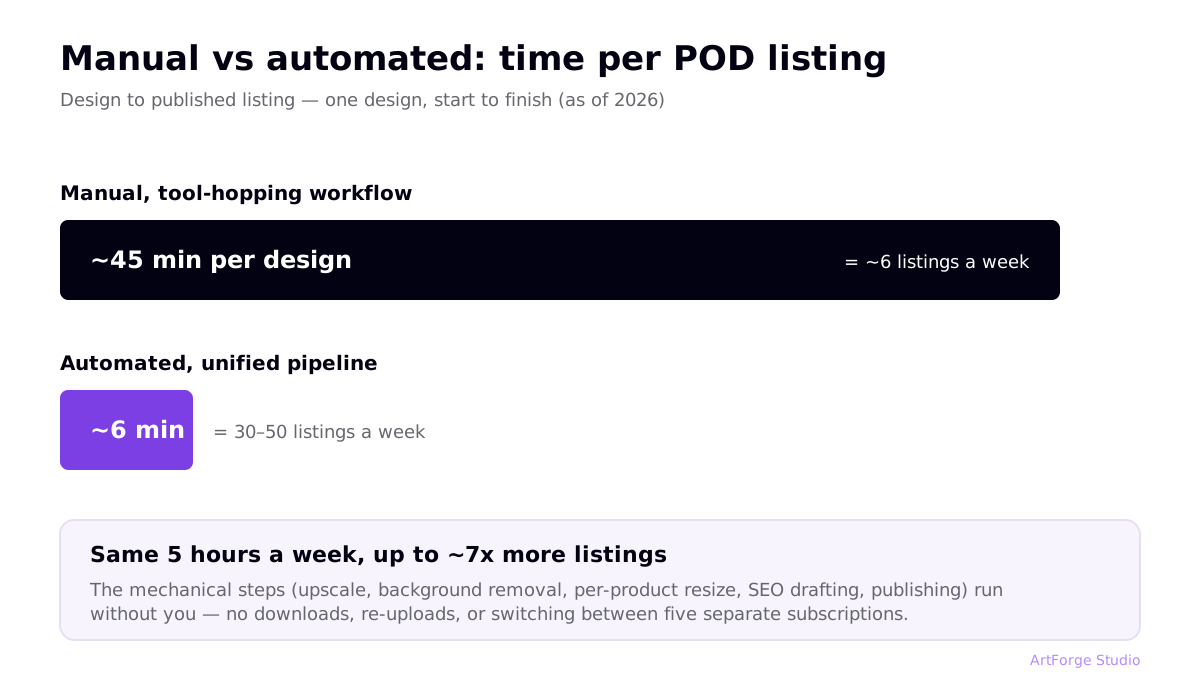
Print on demand is a numbers game. The seller who publishes 50 quality listings a month learns faster, ranks for more keywords, and finds winners sooner than the seller who publishes 10. Yet most sellers still run a workflow that takes 45 minutes or more per design — which caps them at a handful of listings a week.
This guide breaks down where that time actually goes, which steps to automate, and what a 6-minute design-to-listing pipeline looks like in practice.
Where the 45 minutes goes: the manual workflow
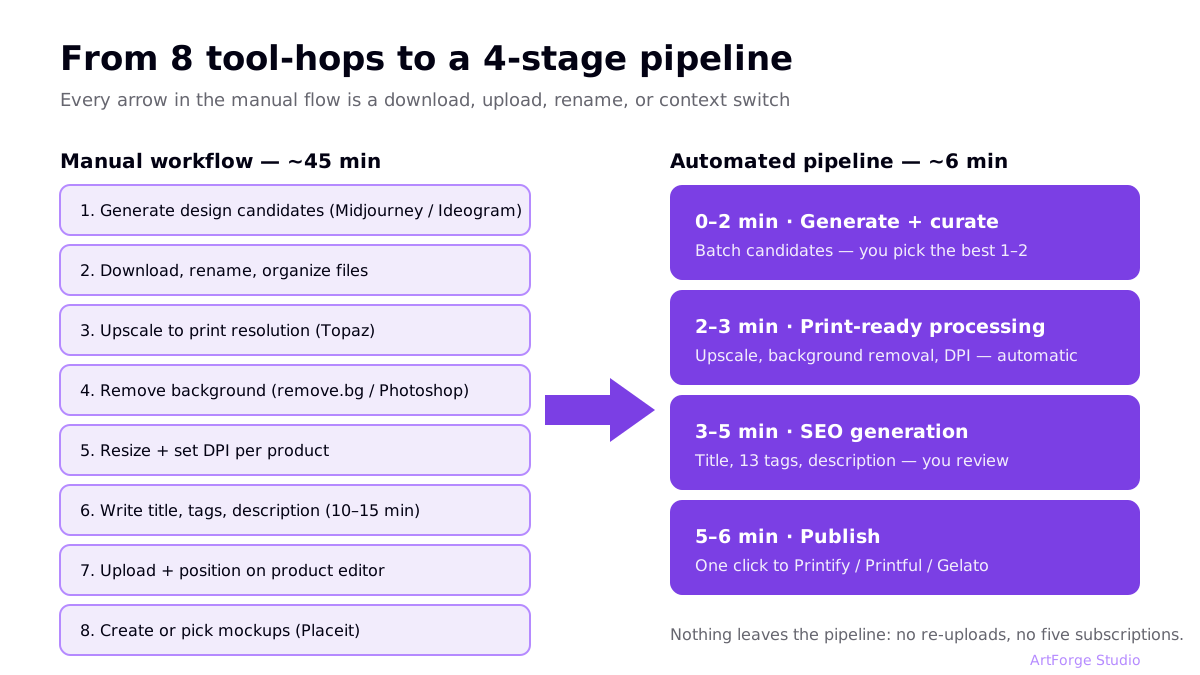
Here is the tool-hopping loop most POD sellers run today:
| Step | Typical tool | Typical time |
|---|---|---|
| Generate design candidates | Midjourney / Ideogram | 5–10 min |
| Download, rename, organize files | File manager | 2–3 min |
| Upscale to print resolution | Topaz / online upscaler | 3–5 min |
| Remove background | remove.bg / Photoshop | 2–4 min |
| Resize + set DPI per product | Photoshop / GIMP | 5–8 min |
| Write title, tags, description | Notes app + keyword tool | 10–15 min |
| Upload and position on product | Printify / Printful editor | 5–8 min |
| Create or pick mockups | Placeit / provider mockups | 3–5 min |
Every arrow between tools costs downloads, uploads, renames, and context switching. Worse, each manual step is a chance to skip quality controls when you are tired — that is when 72 DPI files and keyword-stuffed titles slip through.
The 6-minute automated pipeline
Automation does not mean removing yourself from the loop. It means the mechanical steps run without you, and you only make decisions. A realistic minute-by-minute pass in a unified pipeline:
| Minute | What happens | Your role |
|---|---|---|
| 0–2 | Prompt an AI model, generate a batch of candidates | Write the prompt, pick the best 1–2 |
| 2–3 | Print-ready processing: upscale, background removal, correct dimensions and DPI | None — automatic |
| 3–5 | SEO generation: title, 13 tags, description drafted from the design and niche | Review, tweak buyer language |
| 5–6 | Publish to connected Printify / Printful / Gelato products | One click, confirm placement |
Six minutes is not a marketing number — it is what falls out when nothing leaves one pipeline: no downloads, no re-uploads, no switching between five subscriptions.
What to automate (and what to keep manual)
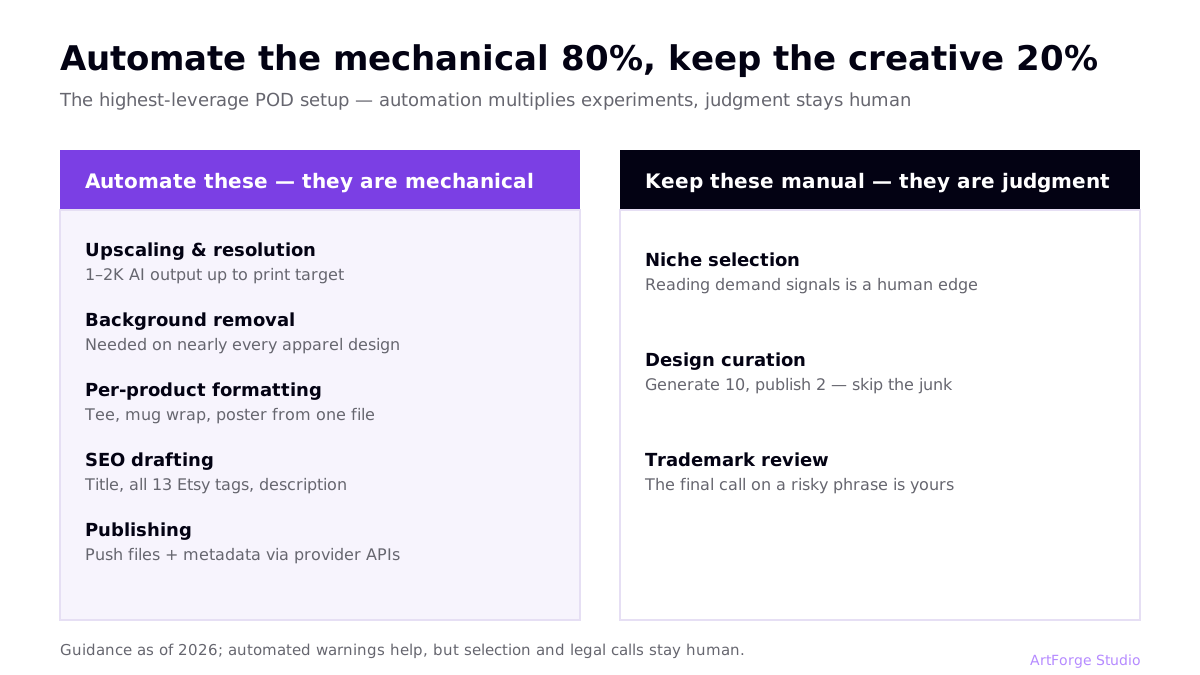
Automate these — they are mechanical
- Upscaling and resolution. AI output is typically around 1–2K pixels; print needs more. An automated upscale-to-target step removes the most common cause of refunds. (Details in the 300 DPI guide.)
- Background removal. Required for nearly every apparel design; a solved problem for software.
- Per-product formatting. A t-shirt file, a mug wrap, and a poster need different dimensions from the same art.
- SEO drafting. AI drafts titles, tags, and descriptions faster than you can, and never forgets to fill all 13 Etsy tags. You edit; it types. (Formulas in Etsy SEO for POD.)
- Publishing. Pushing finished files and metadata to Printify, Printful, or Gelato via their APIs instead of clicking through each editor.
Keep these manual — they are judgment
- Niche selection. Reading demand signals is still a human edge.
- Design curation. Publishing every generation is how shops fill up with junk. Generate 10, publish 2.
- Trademark review. Automated warnings help, but the final call on a risky phrase is yours. Our trademark guide covers what to check.
Three ways to build the stack
| Approach | What it looks like | Pros | Cons |
|---|---|---|---|
| DIY multi-tool stack | Midjourney + upscaler + remove.bg + Photoshop + keyword tool + provider editors | Best-in-class at each step, full control | 4–6 subscriptions; every handoff is manual; slowest per listing |
| Scripts + APIs | Custom scripts against Printify/Printful APIs | Fully tailored | Requires coding; you maintain it forever |
| Unified pipeline tool | One tool that generates, processes, writes SEO, and publishes (ArtForge, or MyDesigns for a different flavor) | Fastest per listing; no handoffs; one subscription | Less control over any single step than a specialist tool |
If you are technical and enjoy maintenance, the API route works. For everyone else, the practical choice is between assembling specialists or adopting a pipeline. Our generator comparison looks at how the design-stage tools stack up, including where specialists genuinely win.
The math that makes automation matter
Say you can invest five hours a week in your shop:
- At 45 minutes per listing: ~6 listings a week, ~26 a month.
- At 6–10 minutes per listing: 30–50 listings a week — or the same 6 listings plus hours left for niche research and design curation, the work that actually differentiates you.
More listings means more keyword surface area and more chances to find a winning design. And when a design does win, speed compounds again: a winner can be re-published across mugs, totes, and posters in minutes instead of another afternoon. If you are brand new to POD, read the step-by-step starter guide first — automation multiplies a working process, it does not fix a broken one.
Four automation mistakes to avoid
- Automating before the process works manually. If your niches are unvalidated and your listings do not convert, automation just produces failure faster. Run the loop by hand for your first 10–20 listings so you know what "good" looks like at each step.
- Publishing everything you generate. The temptation of a fast pipeline is to skip curation. A shop of 300 mediocre listings performs worse than 60 strong ones — buyer engagement per listing feeds marketplace ranking, and weak listings drag the shop's averages down.
- One SEO template for every design. Automated SEO drafting is a starting point, not a final answer. If every listing in your shop has near-identical titles with one word swapped, you are competing with yourself for the same queries. Vary the primary keyword per design.
- Forgetting the legal check. Speed makes it easier to publish a risky phrase before thinking. Keep the trademark review as a deliberate pause in the pipeline — it is the one step where slowing down pays for itself.
What a well-automated week looks like
A realistic rhythm for a part-time seller with an automated pipeline:
- Monday (1 hr): niche and keyword research — collect buyer phrases, pick 2 design themes for the week.
- Tuesday–Wednesday (2 hrs): generation sessions — batch-generate both themes, curate down to the best 10–15 designs.
- Thursday (1 hr): production pass — print-prep, SEO review, and publish the batch across connected platforms.
- Weekend (30 min): read the data — views, favorites, and sales per listing; feed winners back into next Monday's themes.
Under five hours, 10–15 new listings, and — crucially — most of the time spent on judgment (research, curation, analysis) rather than file handling. Reverse those proportions and you have the manual workflow most sellers are stuck in.
A note on batch workflows
Once single-design flow is under 10 minutes, the next unlock is batching: generate a themed set (for example, 8 designs for one niche), run print-prep on all of them at once, do one SEO pass, and publish the batch to every connected platform together. Batching turns a weekend of work into an evening, and it keeps a niche shop looking consistent — buyers see a coherent collection rather than scattered one-offs.
FAQ
Can print on demand be fully automated?
The production side can be almost fully automated: generation, print preparation, SEO metadata, and publishing. What should stay human is niche research, design selection, and trademark judgment. Automating the mechanical 80% while keeping the creative 20% manual is the highest-leverage setup.
What parts of the workflow take the most time manually?
For most sellers it is file preparation (upscaling, background removal, resizing per product) and writing listing SEO. Together these usually consume more time than design generation itself — and both are highly automatable.
Is 6 minutes from design to listing realistic?
Yes, when the steps run in one pipeline: prompt and generate (~2 minutes including selection), automatic print-ready processing (~1 minute), AI-drafted SEO you review (~1–2 minutes), and one-click publishing (~1 minute). The same steps across separate tools commonly take 45 minutes or more.
Does automation hurt listing quality?
Only if you automate selection. Keep a human decision at two points — which designs are good enough to publish, and whether the SEO draft matches buyer language — and quality goes up, because you iterate faster.