7 Kittl Alternatives That Actually Publish to Printify (2026)
Let's be fair to Kittl first: it is genuinely good software. The typography tools are excellent, the template library is deep, and the AI features keep improving. If your bottleneck is making beautiful designs, Kittl solves it.
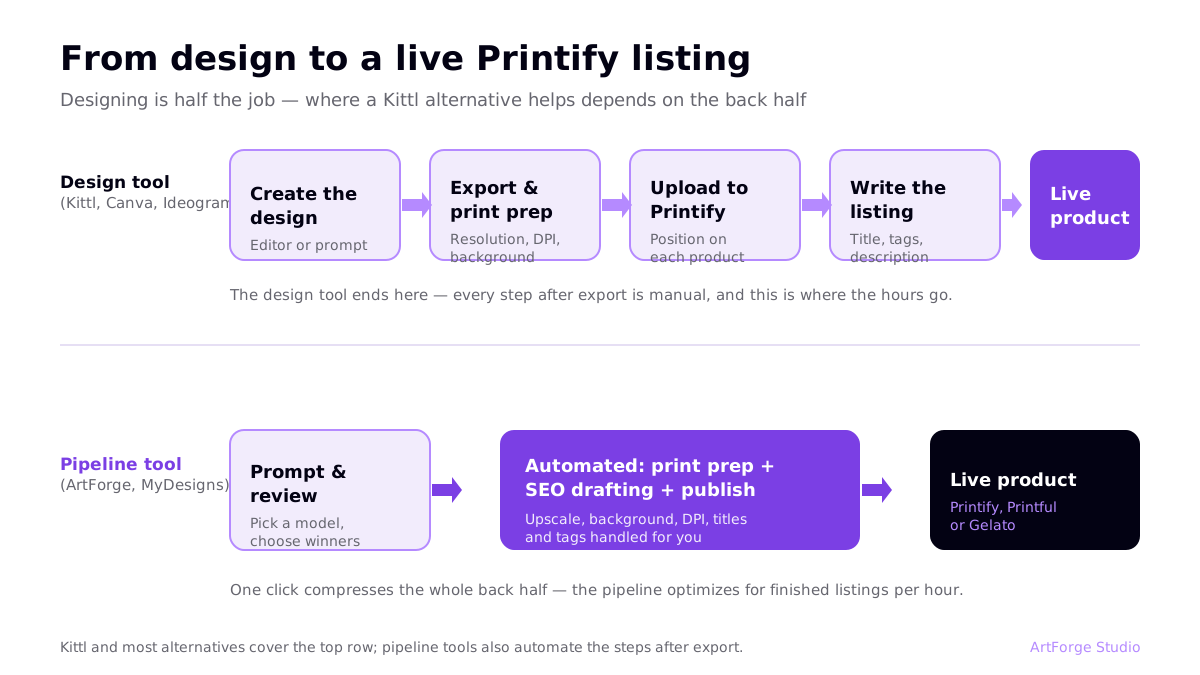
But for print-on-demand sellers, designing is only half the job. After Kittl, you still export files, check resolution, upload to Printify, position artwork on each product, and write titles, tags, and descriptions. That back half is where hours disappear — and it is why "Kittl alternatives" is usually really a search for a shorter path from idea to live product.
Transparency: ArtForge (that's us) is on this list. We have put honest trade-offs on every entry, ours included.
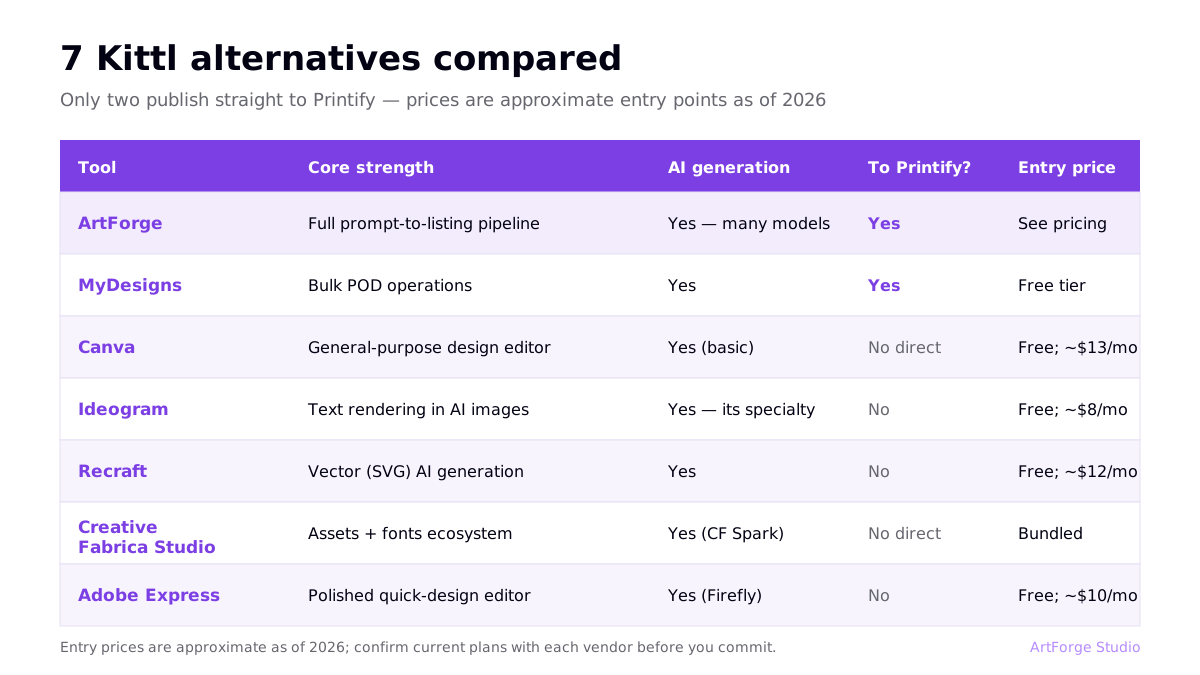
Quick comparison
| Tool | Core strength | AI generation | Publishes to Printify? | Entry price |
|---|---|---|---|---|
| ArtForge | Full prompt-to-listing pipeline | Yes — multiple models | Yes (+ Printful, Gelato) | See pricing |
| MyDesigns | Bulk POD operations | Yes | Yes | Free tier; paid plans vary |
| Canva | General-purpose design editor | Yes (basic) | No direct Printify publishing | Free; Pro ~$13/mo |
| Ideogram | Text rendering in AI images | Yes — its specialty | No | Free tier; paid from ~$8/mo |
| Recraft | Vector (SVG) AI generation | Yes | No | Free tier; paid from ~$12/mo |
| Creative Fabrica Studio | Assets + fonts ecosystem | Yes | No direct publishing | Bundled with subscription |
| Adobe Express | Polished quick-design editor | Yes (Firefly) | No | Free; paid ~$10/mo |
Prices are approximate entry points as of writing; check each vendor for current plans.
1. ArtForge — for sellers who want the whole pipeline
Best for: POD sellers optimizing for listings published per hour.
ArtForge is built around one idea: every step between prompt and live listing should live in one tool. You generate with a choice of state-of-the-art AI models, the platform makes files print-ready automatically (upscaling, background removal, correct DPI — the details in our 300 DPI guide happen without you), AI drafts your SEO titles and tags, and one click publishes to Printify, Printful, or Gelato.
Honest trade-off: ArtForge is not a hands-on vector editor. If you want to kern type and nudge anchor points, Kittl is better at that specific job. ArtForge wins when speed and volume matter more than pixel-level manual control.
2. MyDesigns — for bulk operators
Best for: High-volume sellers who live in spreadsheets.
MyDesigns approaches POD like an operations platform: bulk generation, bulk mockups, bulk publishing, dynamic templates. It connects to POD platforms directly and is one of the few tools that shares ArtForge's "pipeline over editor" philosophy. Trade-off: the learning curve is real — the interface is dense, and casual sellers can find it overwhelming compared to simpler tools.
3. Canva — for versatility beyond POD
Best for: Sellers who also make social posts, ads, and thumbnails.
Canva is the world's default design tool for a reason: enormous template library, gentle learning curve, and steadily improving AI features. For POD specifically, watch two things: export resolution (you need print dimensions, not social-media dimensions) and content licensing — some Canva elements carry usage restrictions on products for resale, so build sellable designs from your own or AI-generated elements.
4. Ideogram — for text-heavy designs
Best for: Quote shirts, badges, and any design where words are the design.
Ideogram's text rendering is the best-known in the business. If Kittl attracted you because typography designs sell, Ideogram gets you similar output from a prompt instead of an editor session. It is a generator, not a pipeline: print prep and publishing remain your job. See how it stacks against the other generators in our full comparison.
5. Recraft — for vector output
Best for: Stickers, logos, and flat graphic styles.
Recraft generates true vector SVGs, which scale to any print size with zero quality loss — the resolution problem simply disappears for flat designs. Style controls are strong. Trade-offs: painterly and photographic styles are not its lane, and there is no product publishing.
6. Creative Fabrica Studio — for asset-driven designers
Best for: Sellers who build designs from fonts, graphics, and craft assets.
Creative Fabrica's subscription bundles a huge marketplace of fonts and graphics (with POD-friendly licensing) plus Studio, its design tool, and AI generation ("CF Spark"). If your design style leans on combining licensed assets — sublimation bundles, craft fonts — the ecosystem is hard to beat. It is not a publishing pipeline, and asset-heavy designs can look similar to other sellers using the same assets.
7. Adobe Express — for a polished quick editor
Best for: Sellers already in the Adobe ecosystem.
Adobe Express is Adobe's fast, template-driven editor with Firefly AI generation built in — and Firefly's training-data approach is designed to be commercially safe, which some sellers value. It is pleasant, capable, and integrates with Photoshop when you need heavier editing. Like the others, it ends at file export; products and listings are a separate workflow.
If you switch: a painless migration checklist
Moving your workflow off Kittl (fully or partly) is easier than it looks, because your real assets are not locked in the tool:
- Export your winners at maximum resolution. Download your best-selling designs as high-res PNGs (and SVGs where available) before your billing period ends. These re-upload cleanly into any pipeline tool.
- Write down your recipes. The fonts, color palettes, and layouts your buyers respond to are knowledge, not files. A one-page style note per niche lets you reproduce your look with AI prompts or new templates.
- Keep listings live during the switch. Your Printify products and marketplace listings are independent of the design tool — nothing about switching tools touches your live shop or its SEO history.
- Run both tools for one billing cycle. Produce a comparable batch in each and measure the only number that matters: finished listings per hour, at quality you would publish.
That last test is worth actually doing. Tool debates on forums are opinions; your own timed batch is data.
How to choose: the one question that decides it
Where do you lose the most time today?
- "Making designs look good" → choose a better editor or generator: Kittl itself, Canva, Ideogram, Recraft, Adobe Express.
- "Everything after the design" — exporting, print prep, uploading, listing SEO → choose a pipeline: ArtForge or MyDesigns. The time math is laid out in our automation guide.
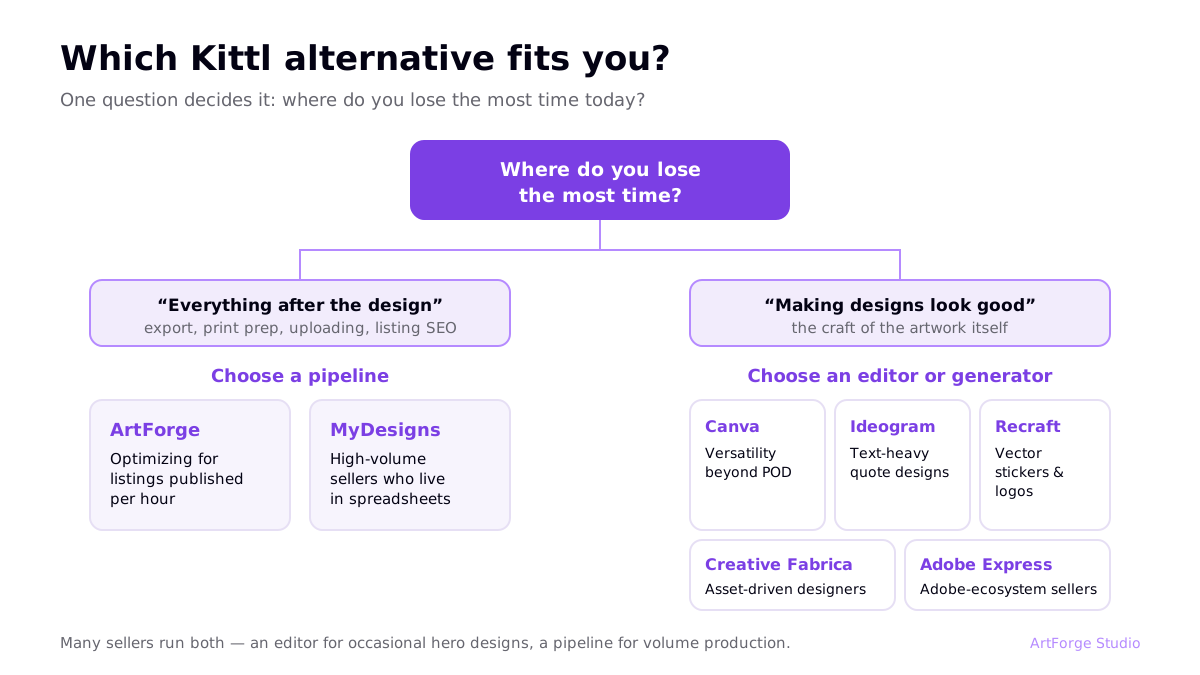
Plenty of successful sellers run both: an editor for occasional hero designs, a pipeline for volume. And whichever tool makes your designs, the listing still has to rank — our Etsy SEO guide covers that half of the battle.
One more filter worth applying: subscription stacking. An editor plus an upscaler plus a mockup tool plus a keyword tool quietly adds up to more per month than any single pipeline platform — count the full stack cost, not the sticker price of each tool alone.
FAQ
Does Kittl publish directly to Printify?
No. Kittl is a design creation tool — you design in Kittl, export the file, then upload it to Printify (or Printful/Gelato) yourself, position it on products, and write the listing separately. For sellers publishing at volume, that export-upload loop is the main reason to look at pipeline tools.
What is the best free Kittl alternative?
Canva's free tier is the most complete free design editor, and Ideogram and Recraft both offer free generation credits. Free tiers are fine for testing, but for POD you will usually hit limits quickly on export resolution, commercial features, or generation volume.
Which alternative is best for complete beginners?
If you want to learn design as a craft, Canva is the gentlest editor. If you want products live as fast as possible without learning design software, a pipeline tool like ArtForge is simpler: prompt, review, publish — print preparation and SEO are handled for you. New to POD entirely? Start with the step-by-step guide.
Can I use Kittl and a pipeline tool together?
Yes, and many sellers do: Kittl for hands-on typographic hero designs, a pipeline tool for volume production and publishing. Design tools and publishing pipelines solve different halves of the same job.