Design Your Own Shirt Online (Free Tools)
You can design your own shirt online for free in about ten minutes, and you do not need any design experience to do it. The process is the same in almost every tool: set the canvas to the print size, add your text or artwork, preview it on a mockup of the shirt, and export a print-ready file. This guide walks through each step, compares the best free tools, and shows how to avoid the one mistake that ruins most home-made shirts — a low-resolution export.
Whether you are making one shirt for a family event or building designs to sell, getting the workflow right the first time saves you reprints and refunds later.
How to design your own shirt in 5 steps
Learn this flow once and it transfers to any tool you choose.
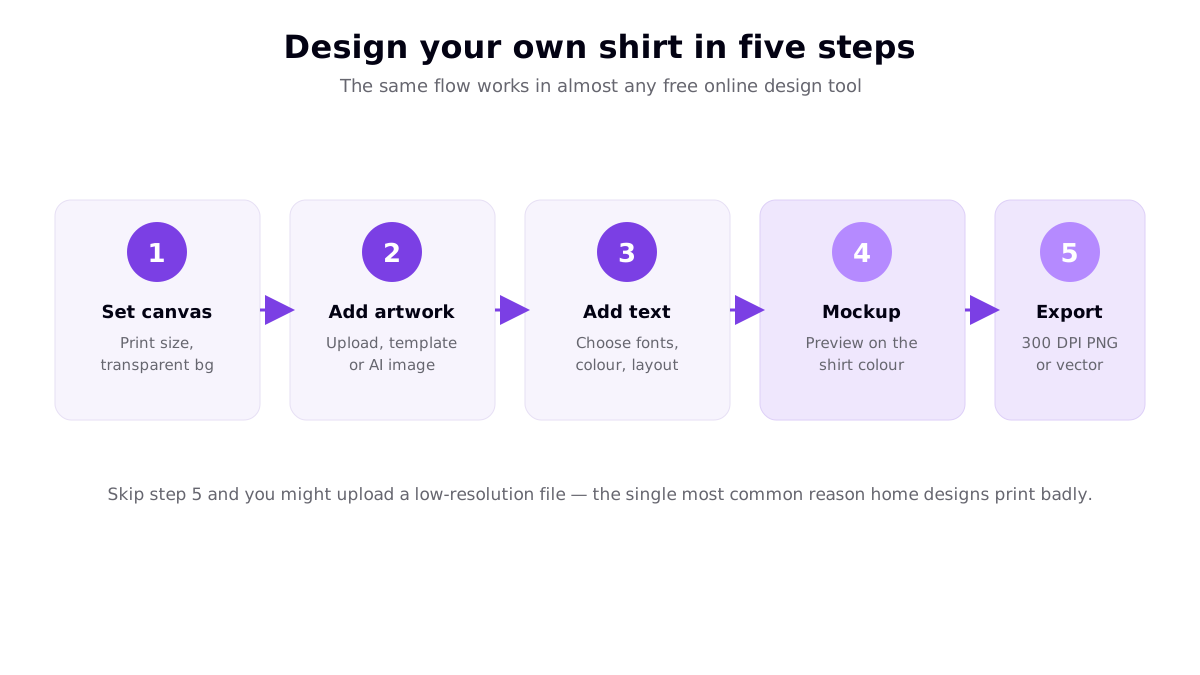
- Set up the canvas. Choose the print size (a full-front adult print is around 11 inches wide) and work on a transparent background so the shirt shows through around your design.
- Add your artwork. Upload an image, start from a template, or generate a graphic with an AI image maker. Keep source images high resolution.
- Add and style text. Pick clear, legible fonts, set colours that contrast with the garment, and arrange the layout so one idea dominates.
- Preview on a mockup. View the design on the actual shirt colour to check contrast, placement and size before committing.
- Export a print-ready file. Save at roughly 300 DPI at print size as a transparent PNG, or as a vector for pure type and simple graphics.
Step five is the one people skip — and a fuzzy, low-resolution file is the single most common reason a home design prints badly. For the full craft of the design itself, see our complete t-shirt design guide.
Free browser tool or desktop software?
Your first decision is where to design. The honest answer for most people is: start in a free browser tool, and only reach for desktop software when you outgrow it.
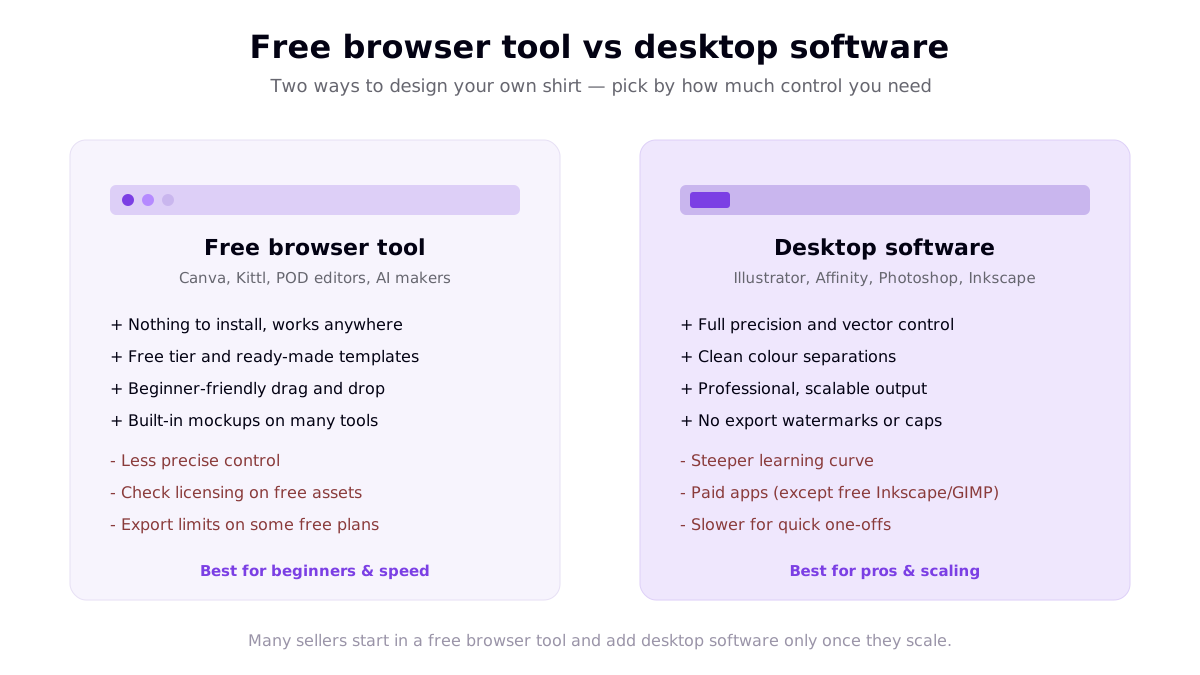
Free browser tools (Canva-style editors, design-marketplace tools, POD built-in editors, AI makers) need nothing installed, offer templates and mockups, and are genuinely beginner-friendly. Desktop software (Illustrator, Affinity Designer, Photoshop, or the free Inkscape and GIMP) gives you precise vector control and clean colour separations that matter once you sell at volume or use screen printing. There is no wrong choice — just start where you are comfortable.
The best free tools to design your own shirt
Rather than name one winner, it helps to compare tool types, because each trades ease against control differently.
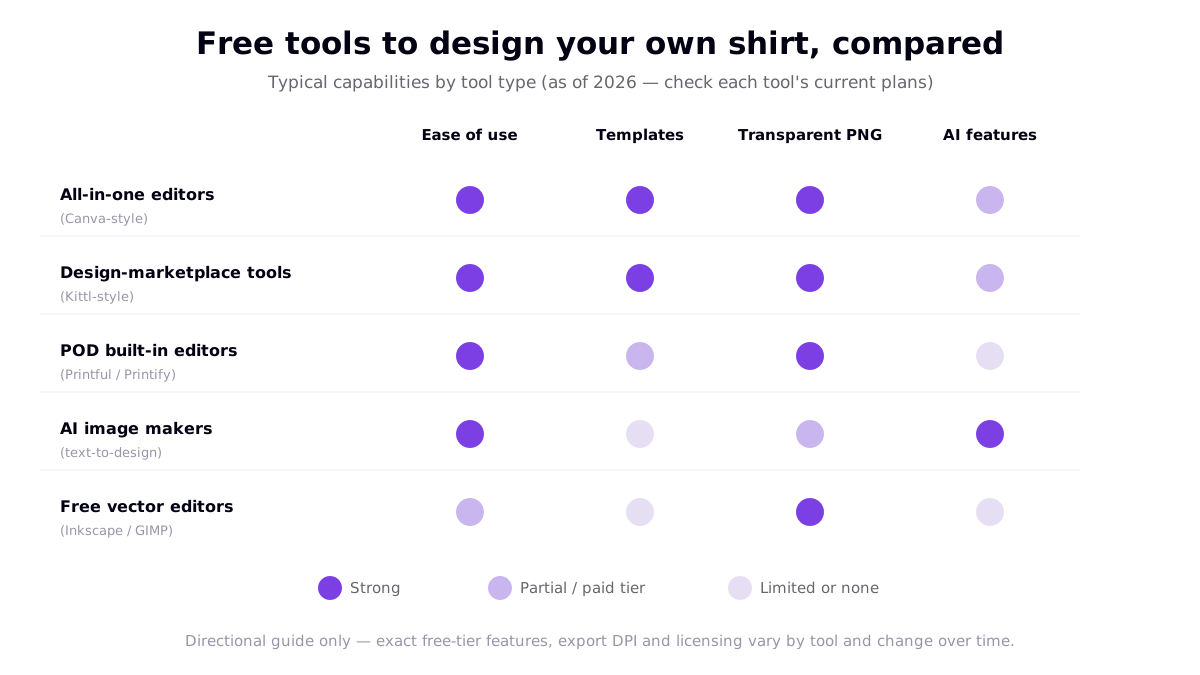
| Tool type | Examples | Best for |
|---|---|---|
| All-in-one editors | Canva-style tools | Fast, template-led design with built-in mockups — see our Canva t-shirt design tutorial |
| Design-marketplace tools | Kittl-style tools | Typography and vintage/badge styles with pro-looking assets |
| POD built-in editors | Printful, Printify editors | Designing directly on the product you'll sell, with correct templates |
| AI image makers | Text-to-design tools | Generating original artwork from a prompt when you can't draw |
| Free vector editors | Inkscape, GIMP | Precise, scalable output at zero cost for the technically minded |
Two cautions on free tiers: confirm you can export at 300 DPI (some free plans cap resolution or add watermarks), and check the licensing on any free graphics, fonts or stock elements before selling — "free to use" does not always mean "free for commercial use." Our roundup of the best t-shirt maker tools goes deeper on free versus paid features.
Design tips for a shirt that looks professional
- One idea per shirt. A single strong graphic or line beats a crowded design every time.
- Mind the garment colour. Design with the shirt colour in view; light art on light fabric disappears.
- Use standard placement. A full-front print centred a few inches below the collar at around 11 inches wide reads as "done right."
- Keep type legible. Large, clear fonts read from a distance; thin scripts can vanish when printed small.
- Preview before you export. Mockups catch contrast and placement problems while they are still free to fix.
- Watch your colour count if screen printing. Each ink colour usually adds a setup charge, so a clean two- or three-colour design is cheaper to produce at volume than full-colour art.
These rules matter because the difference between a homemade-looking shirt and a professional one is rarely the artwork itself — it is the details of resolution, contrast, placement and restraint. Spend a couple of extra minutes on the mockup step and you avoid the most common disappointments people report after their first custom order.
Pick the right blank shirt
The garment matters as much as the design. Consider the fabric and print method together: cotton takes direct-to-garment and DTF printing well, while polyester and blends suit sublimation for all-over, edge-to-edge colour. Think about fit and colour range too — a design you love on white may need adjusting for a dark or heather blank. If you are ordering through a print-on-demand provider, the product page lists the exact print area and recommended file size, which saves guesswork before you export.
From design to a real shirt
Once your file is ready, you have two paths. Order a single custom shirt from an online printer for personal use, or upload the design to a print-on-demand service to sell it with no inventory — the provider prints and ships each order after a customer buys. Either way, order a sample first: print quality and colour vary between products and providers, and seeing the real thing before you scale a design is always worth the small cost.
If you want to turn your designs into a small business, our guide to selling t-shirt designs online covers the routes from a finished file to actual sales.
Frequently asked questions
Can I design my own shirt online for free?
Yes. Several tools let you design a shirt for free, including all-in-one editors like Canva, design-marketplace tools such as Kittl, the built-in editors inside print-on-demand services like Printful and Printify, and free vector editors like Inkscape. You can add text, upload images, use templates and preview a mockup at no cost. Watch two things on free tiers: export resolution (you want 300 DPI at print size) and the licensing terms on any free graphics or fonts you use commercially.
What is the easiest way to design your own shirt?
The easiest route for most people is a free browser-based editor with drag-and-drop and ready-made templates — nothing to install and no design experience required. Set the canvas to the print size, add your text or artwork, preview it on a mockup of the shirt colour, and export a transparent-background PNG. If you plan to sell in volume or need precise vector control, you can add desktop software later.
What size and format should my shirt design file be?
Design at the final print size and export at roughly 300 DPI so the print is sharp — a 12-inch-wide design needs about 3,600 pixels across. For apparel, a transparent-background PNG is the widely accepted format so the shirt shows through around your design. For pure text and simple graphics, a vector file (SVG, AI or PDF) scales without any quality loss. Keep an editable working file too.
Do I need design skills to design my own shirt?
No. Many best-selling shirts are simple typography or a single clean graphic that needs no drawing ability. Free tools provide templates, fonts and elements you can arrange yourself, and AI image makers can generate artwork from a text prompt that you then refine. The most important skill is having a clear idea for a specific audience and keeping the design clean and legible.
Resources
- Canva — T-Shirt Design Maker (top ranking result for the primary keyword)
- Custom Ink — Design & Make Your Own Custom Shirts (top ranking result)
- RushOrderTees — Create Your Own T-Shirts (top ranking result)
- Printful — How to Prepare the Perfect Print File (file format and resolution reference)