Best T Shirt Maker Tools: Free & Paid (2026)
A t-shirt maker is any tool that lets you build a shirt design and turn it into a file you can print or sell. The best t-shirt maker for you depends entirely on your goal: fast one-off designs, a growing print-on-demand catalogue, or precise vector artwork for screen printing. This guide compares eight types of t-shirt maker tools — free and paid — on the four things that actually matter: templates, AI generation, built-in mockups, and print-ready export.
Rather than crown a single winner, we'll match tool types to what you're trying to do, because the "best" drag-and-drop editor and the "best" professional suite are answering completely different questions.
T-shirt maker tools compared at a glance
Here's how the main categories stack up on the capabilities that separate a quick mockup from a truly print-ready file.
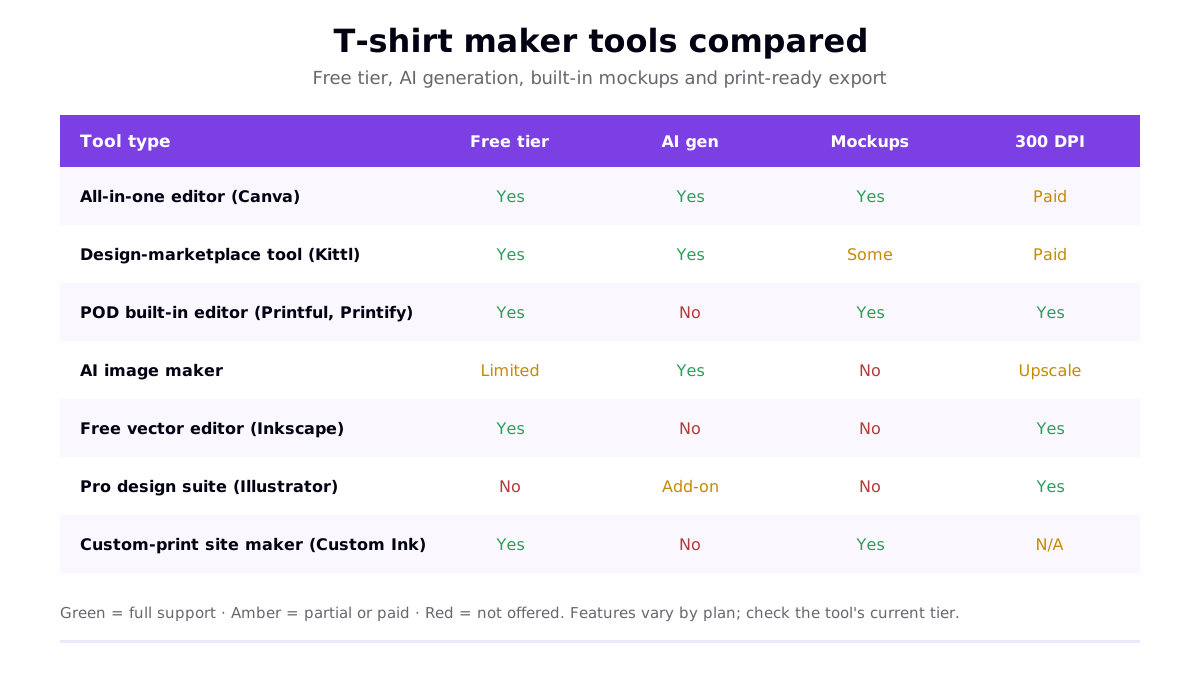
| Tool type | Examples | Best for |
|---|---|---|
| All-in-one editor | Canva-style tools | Beginners who want templates, fonts and mockups in one place — see our Canva t-shirt design tutorial |
| Design-marketplace tool | Kittl-style tools | Typography, vintage and badge styles with pro-looking assets |
| POD built-in editor | Printful, Printify editors | Designing directly on the product you'll sell, with correct print templates |
| AI image maker | Text-to-design tools | Generating original artwork from a prompt when you can't draw |
| Free vector editor | Inkscape, GIMP | Precise, scalable output at zero cost for the technically minded |
| Pro design suite | Adobe Illustrator, Affinity | Selling at volume, screen printing and clean colour separations — see the Illustrator t-shirt tutorial |
| Custom-print site maker | Custom Ink, UberPrints | Ordering a batch of printed shirts for an event, not building a catalogue |
Free vs paid t-shirt makers
Almost every t-shirt maker in the list above has a genuinely usable free tier. The honest advice for most people is to start free and only pay when a specific limit gets in your way. Two things commonly push people to a paid plan:
- Export quality. Some free plans cap resolution or stamp a watermark. Because good printing needs roughly 300 DPI at the print size, a resolution cap is the most common reason to upgrade.
- Commercial licensing. Free graphics, fonts and stock elements are not always cleared for selling. Paid tiers often include broader commercial rights, which matters the moment you list a design for sale.
Everything else — templates, layout tools, mockups — is usually available for free. Don't pay for a tool until you've hit a wall you can name.
How a t-shirt maker fits your workflow
Whatever tool you choose, the path from idea to a real shirt is the same. Understanding it helps you pick a maker that won't create a bottleneck later.
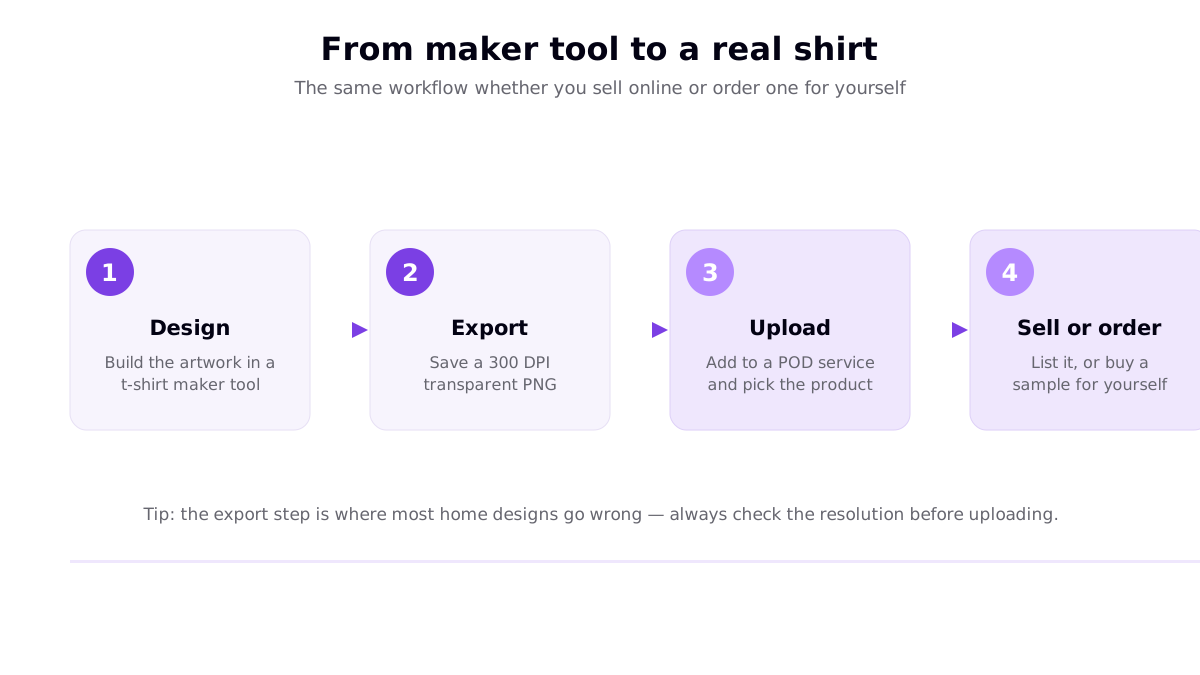
- Design the artwork in your t-shirt maker of choice, working at the final print size on a transparent background.
- Export a print-ready file — typically a 300 DPI transparent PNG, or a vector for pure type and simple graphics.
- Upload to a print-on-demand service, or send to a printer, and pick the product and placement.
- Sell or order — list the design with no inventory, or buy a sample to check the print before you scale.
The export step is where home designs most often fail. For the full checklist on getting a sharp print, see our guide to designing your own shirt online.
Which t-shirt maker should you use?
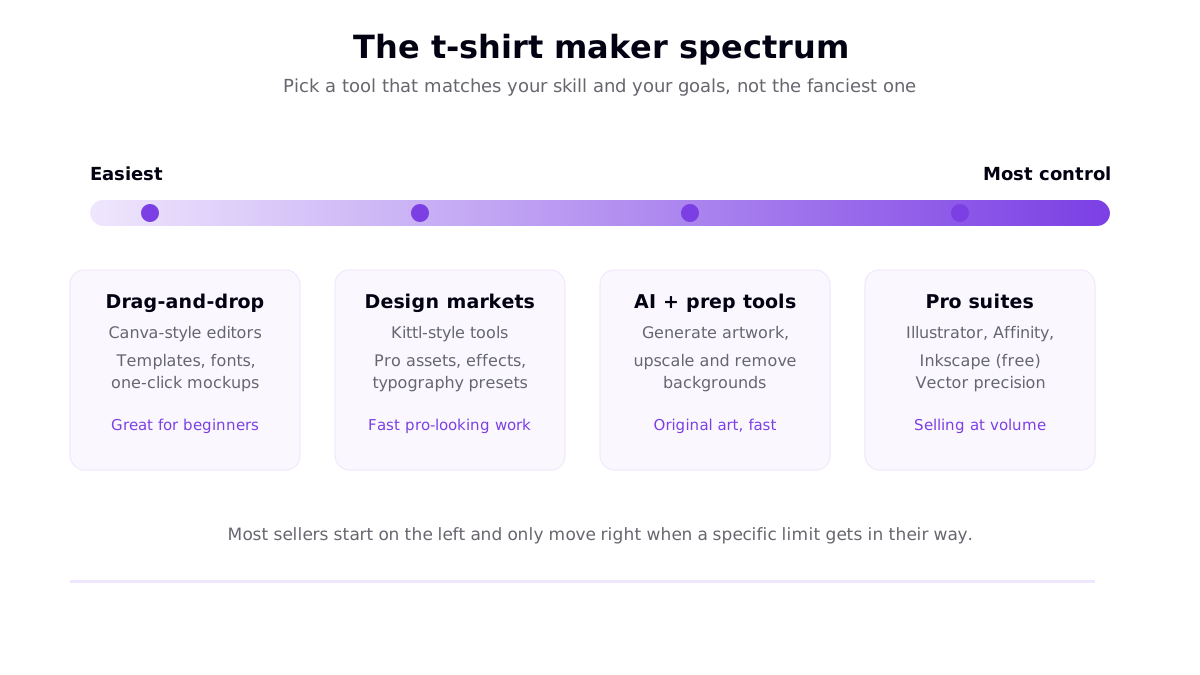
Think of the tools as a spectrum from easiest to most powerful, and start at the point that matches your comfort level rather than the most advanced option.
If you're a total beginner
Use an all-in-one drag-and-drop editor. You get templates, fonts, elements and a mockup preview with nothing to install. Most people can produce a clean, sellable design in their first session. Add an AI image maker alongside it when you want original artwork you can't find in the template library.
If you want a pro look fast
Design-marketplace tools shine at typography-led and vintage styles that would take hours to build from scratch elsewhere. They sit between beginner editors and full suites — more polish, still approachable. Our roundup of Kittl alternatives covers this category in depth.
If you're building a real POD business
Lean on the built-in editors inside your print-on-demand service for correct templates and safe print areas, and reach for a pro suite like Illustrator (or the free Inkscape) when you need clean vector separations for screen printing or want total control over the artwork. Many sellers combine an AI maker for artwork with a POD editor for placement.
What makes a t-shirt maker actually good
Feature lists are easy to pad, so judge any t-shirt maker on these five practical points:
- Print-ready export. Can it output a transparent PNG at 300 DPI, or a clean vector? This is non-negotiable for anything you'll print.
- Honest mockups. A mockup on the real garment colour catches contrast and placement problems while they're free to fix.
- Commercial licensing clarity. You should be able to tell, quickly, whether the assets you're using are cleared for selling.
- Template quality. Good starting points speed you up; generic ones just get copied by everyone else, so plan to customise heavily.
- Room to grow. A tool you'll outgrow in a month is a false economy — pick one whose ceiling is above your goals.
Get those five right and the brand name on the tool barely matters. A beginner with a clear idea and a free editor beats a pro suite used without a plan.
From a finished design to sales
A t-shirt maker only produces a file — turning that file into shirts people buy is the next step. You can order printed shirts directly from a custom-print site for an event, or upload your design to a print-on-demand service and sell with no inventory, where the provider prints and ships each order after a customer buys. If selling is your aim, our guide to selling t-shirt designs online walks through the routes from a finished file to real income, and the wider t-shirt design guide covers the craft of the artwork itself.
Frequently asked questions
What is the best free t-shirt maker?
There is no single winner — the best free t-shirt maker depends on your goal. For fast, template-led design with built-in mockups, an all-in-one editor like Canva is the most popular starting point. For typography and vintage badge styles, a design-marketplace tool such as Kittl works well. If you want to design directly on the product you will sell, the built-in editors inside print-on-demand services like Printful and Printify are free. And for precise vector output at zero cost, Inkscape is the go-to. Check each free tier for export resolution limits and watermarks before you commit.
Can I make a t-shirt design online for free?
Yes. Most popular t-shirt maker tools have a free tier that lets you add text, upload images, use templates and preview a mockup at no cost. The two things to watch on free plans are export resolution (you want roughly 300 DPI at the print size so the print is sharp) and the licensing terms on any free graphics, fonts or stock elements if you plan to sell commercially. Free to use does not always mean free for commercial use.
What file should a t-shirt maker export for printing?
For most apparel, export a transparent-background PNG at roughly 300 DPI at the final print size, so the shirt shows through around your design and the print stays crisp. A full-front adult print is about 11 to 12 inches wide, which means around 3,300 to 3,600 pixels across at 300 DPI. For pure text and simple graphics, or for vinyl cutting, a vector file such as SVG, AI or PDF scales without any loss. Always keep an editable working file too.
Do I need design skills to use a t-shirt maker?
No. Modern t-shirt maker tools are built for people with no design background. Templates, drag-and-drop layouts, ready-made fonts and AI image generation let you produce a clean, sellable design without drawing anything. The most valuable skill is judgment — picking a clear idea for a specific audience and keeping the design legible — rather than technical drawing ability.
Resources
- Custom Ink — Online T-Shirt Design Lab (top ranking result for the primary keyword)
- Canva — T-Shirt Design Maker (top ranking result)
- UberPrints — No Minimum Custom T-Shirts (top ranking result)
- Printful — How to Prepare the Perfect Print File (file format and resolution reference)