WooCommerce Print on Demand: WordPress Guide
WooCommerce print on demand turns any WordPress site into a store that sells custom products without inventory: you install a free print-on-demand plugin, connect a provider like Printful, Printify, or Gelato, and when a customer buys, the provider prints and ships the item directly. WooCommerce itself is a free plugin, so your main fixed cost is WordPress hosting.
For anyone already on WordPress — or anyone who wants full ownership and low platform fees — this is one of the most cost-effective ways to run print on demand. This guide covers the full setup, the best POD plugins, and how WooCommerce compares on cost to Shopify and Wix.
Why choose WooCommerce for print on demand
WooCommerce is the e-commerce plugin for WordPress. Because it is open-source and self-hosted, it gives you two things hosted platforms cannot match:
- Low fixed cost. The plugin is free; you pay only for hosting and a domain.
- Full ownership and control. Your site, your data, your customer list — no platform between you and your buyers.
The trade-off is responsibility: you manage hosting, updates, backups, and security yourself. If you would rather a platform handle all of that, compare with our Shopify print on demand guide before deciding.
How to set up WooCommerce print on demand
The whole setup is six steps, and none of them require code.
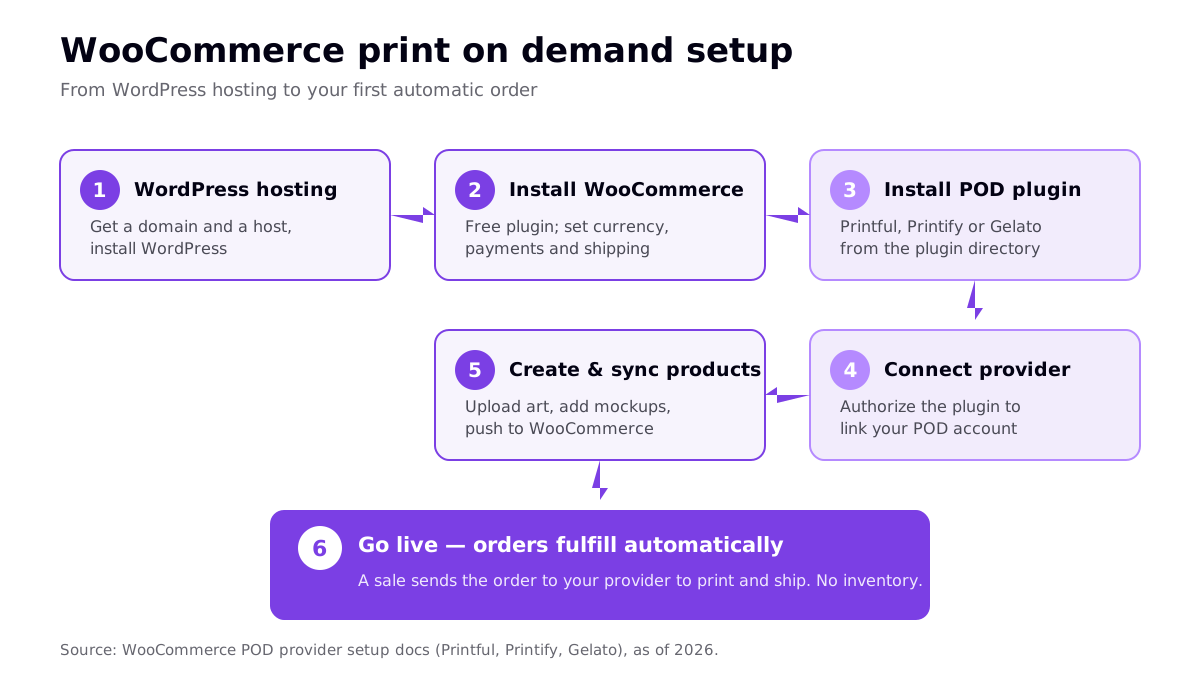
- Get WordPress hosting. Choose a host, register a domain, and install WordPress (many hosts do this in one click).
- Install WooCommerce. From your WordPress dashboard, go to Plugins, search for WooCommerce, install and activate it, then run the setup wizard to set currency, payments, and shipping.
- Install a POD plugin. Add the plugin for your chosen provider — Printful, Printify, or Gelato — from the WordPress plugin directory.
- Connect your provider account. Activate the plugin and authorize it to link your (free) POD account to the store.
- Create and sync products. In the provider's dashboard, pick an item, upload your artwork, generate mockups, set the retail price, and publish it to WooCommerce, where it appears with images and variants.
- Go live. From here, a sale automatically forwards the order to your provider to print and ship. You never touch inventory.
If you are generating designs with AI, prepare the files at the right resolution first — our 300 DPI print-ready guide covers exactly what printers need.
Best print on demand plugins for WooCommerce
The three major providers all offer official, free WooCommerce plugins. You pay per order, not per month, so the decision is about quality, catalog, and where your customers are.
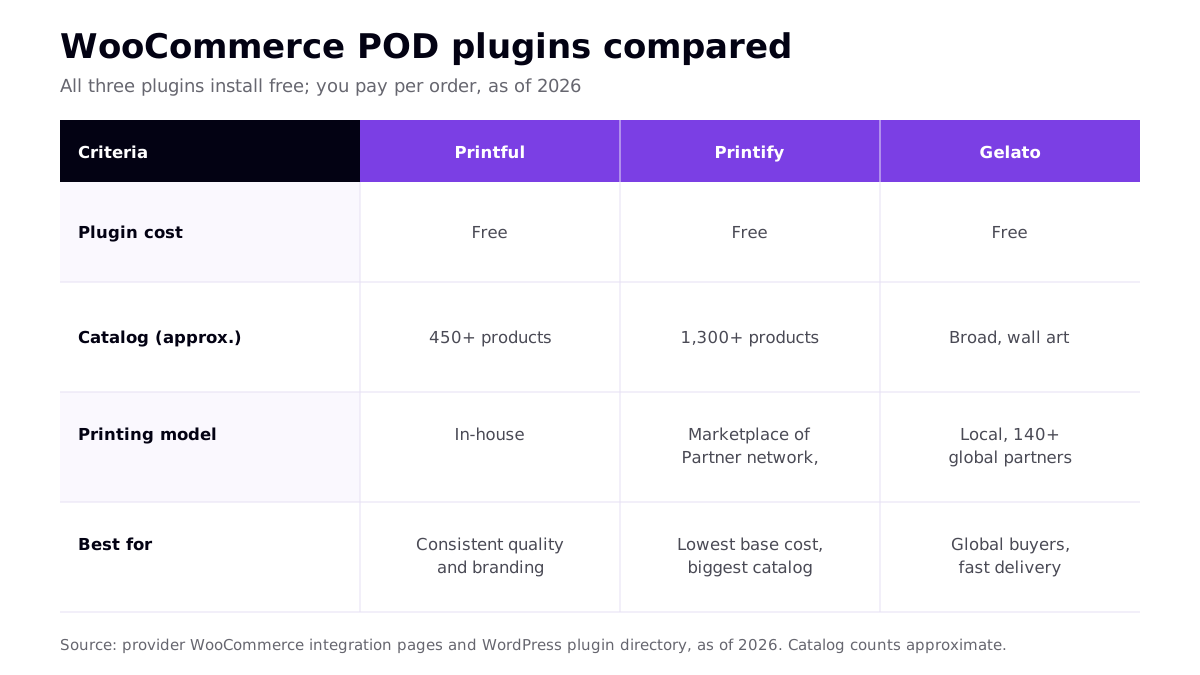
- Printful — in-house printing with consistent quality and strong branding options. Higher base costs; the choice when quality matters most. See our Printful review.
- Printify — the largest catalog (1,300+ products) and lowest base costs via a network of print partners. Order samples, since quality varies by partner.
- Gelato — a global network of 140+ partners printing near the customer, excellent for international buyers and wall art. See our Gelato review.
Other providers such as Gooten also integrate with WooCommerce; see our Gooten review if base cost is your priority. You can run more than one plugin at once and route each product to the best provider.
WooCommerce vs Shopify vs Wix on cost
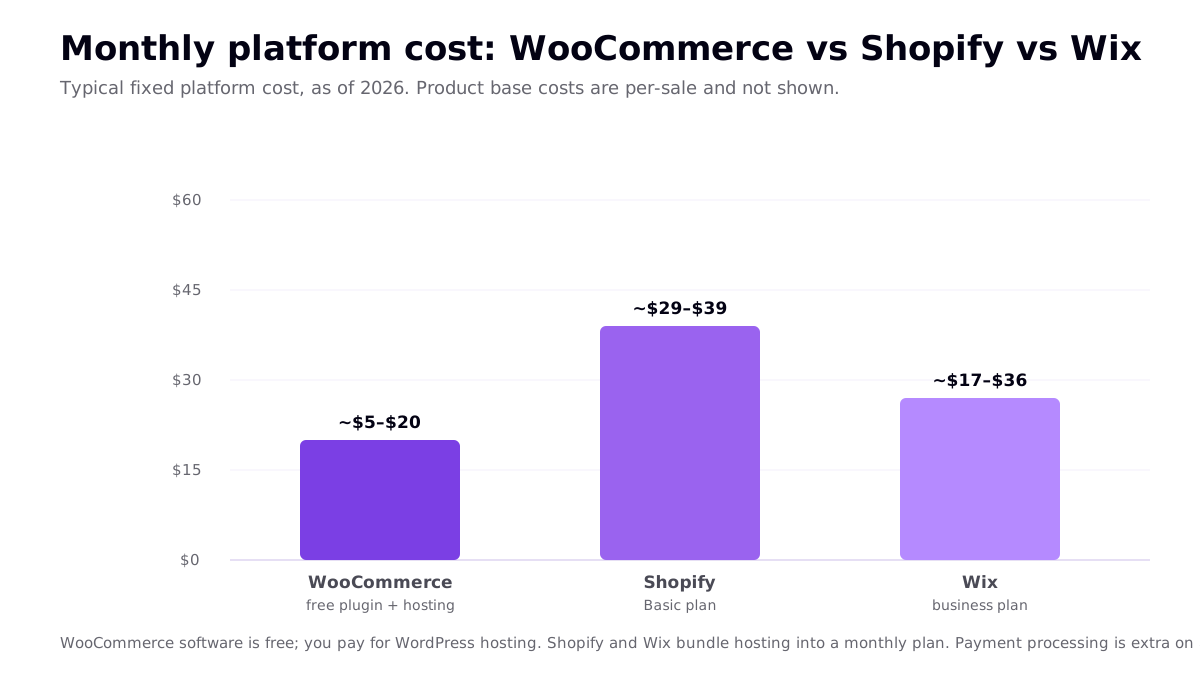
Cost is the most common reason sellers pick WooCommerce. Because the software is free, your platform cost is just hosting — usually lower than a hosted plan, in exchange for doing more of the management yourself.
| Platform | Typical monthly cost (2026) | Hosting | Best for |
|---|---|---|---|
| WooCommerce | ~$5–$20 (hosting) | You choose and manage it | WordPress users, lowest fixed cost, full control |
| Shopify | ~$29–$39 (Basic) | Included | Hands-off hosting, fastest to launch |
| Wix | ~$17–$36 (business plan) | Included | Simple drag-and-drop, small stores |
Product base costs and payment processing fees are paid per sale on all three, so the numbers above are platform cost only. WooCommerce wins on fixed cost; Shopify and Wix win on convenience.
WooCommerce pros and cons for print on demand
Before you commit, weigh what self-hosting actually buys you against what it asks of you. The trade-offs are consistent across every WooCommerce store.
| Pros | Cons |
|---|---|
| Free software; lowest fixed platform cost | You manage hosting, updates, and backups |
| Complete control of design and checkout | Steeper learning curve than hosted platforms |
| You own your data and customer list | Security and performance are your responsibility |
| Huge plugin ecosystem for any feature | Plugin conflicts can require troubleshooting |
| Excellent for content-driven SEO | No single support line — support is spread across plugins and host |
In short, WooCommerce rewards sellers who want maximum control and minimum recurring fees and are comfortable doing a little technical upkeep. If that upkeep sounds like a distraction from designing and marketing, a hosted platform may be the better use of your time even at a higher monthly cost.
WordPress POD tips that save headaches
- Pick a lightweight, e-commerce-ready theme. Heavy themes slow the store and hurt conversions.
- Set up a caching and security plugin. Since you self-host, performance and protection are your job.
- Order a sample of each product before scaling a design, so you catch quality issues early.
- Use WooCommerce's SEO strengths. WordPress is excellent for content, so pair product pages with blog content targeting buyer keywords.
- Keep everything updated. WordPress core, WooCommerce, and your POD plugin all need regular updates.
For the bigger picture of building a store into a business, see our print on demand business playbook.
Frequently asked questions
Is WooCommerce good for print on demand?
Yes, especially if you already use WordPress or want full ownership and low fixed costs. WooCommerce is a free plugin that turns any WordPress site into a store, and the major print-on-demand providers — Printful, Printify, and Gelato — offer free WooCommerce plugins that automate fulfillment. The trade-off is that you manage hosting, updates, and security yourself rather than a hosted platform doing it for you.
What is the best print on demand plugin for WooCommerce?
There is no single best plugin for everyone. Printful's plugin is the common pick for consistent in-house quality and branding; Printify's plugin offers the largest catalog and lowest base costs; and Gelato's plugin is strong for global buyers and wall art with local production. All three plugins are free to install, so many sellers test more than one before committing.
How much does a WooCommerce print on demand store cost?
The WooCommerce plugin itself is free, and the POD plugins are free too. Your main fixed cost is WordPress hosting, typically around $5 to $20 per month for a starter store, plus a domain. That is usually lower than a hosted platform like Shopify, though you take on more technical management. Product base costs and payment processing fees are paid per sale on top.
Can I use print on demand on Wix or Squarespace instead?
Yes. Wix and Squarespace both support print on demand through provider integrations — for example, Printful connects to both — so you can run a POD store on either without WordPress. They are simpler to manage than WooCommerce because hosting is bundled in, but they offer less flexibility and their monthly plans can cost more than self-hosted WooCommerce.
Related reading
- Shopify Print on Demand: Complete 2026 Guide
- Best Print on Demand Sites Ranked for 2026
- Best Print on Demand Software & Tools 2026
- Print on Demand Business: The 2026 Playbook