Shopify Print on Demand: Complete 2026 Guide
Shopify print on demand lets you run a fully branded online store without ever holding inventory: you connect a print-on-demand app, list your designs, and when a customer buys, the order is automatically forwarded to a fulfillment partner that prints and ships the product directly. You only pay the product's base cost after a sale is made.
Shopify is one of the most flexible platforms for this model because it plugs into 200+ print-on-demand apps and gives you complete control over your storefront, brand, and customer data. This guide covers how it works, what it truly costs per month, which POD app to choose, and the exact steps to launch.
How Shopify print on demand works
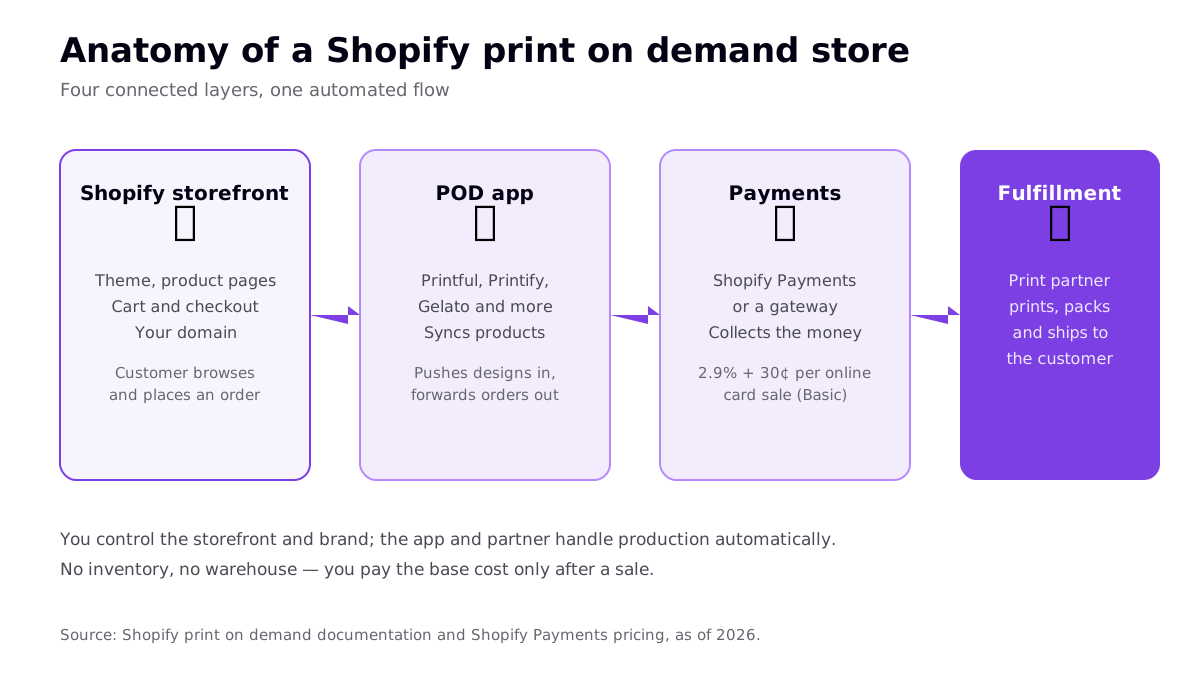
A Shopify POD store has four connected layers. Your storefront is where customers browse and check out. A print-on-demand app syncs your products into the store and forwards orders out to fulfillment. Shopify Payments (or a third-party gateway) collects the money. And your fulfillment partner prints, packs, and ships each item.
The key difference from a marketplace like Etsy is ownership. On Shopify, the store is yours — your domain, your design, your email list. The trade-off is that no traffic arrives on its own; you build it. For a deeper contrast of the two models, see our best print on demand sites comparison.
What Shopify print on demand really costs per month
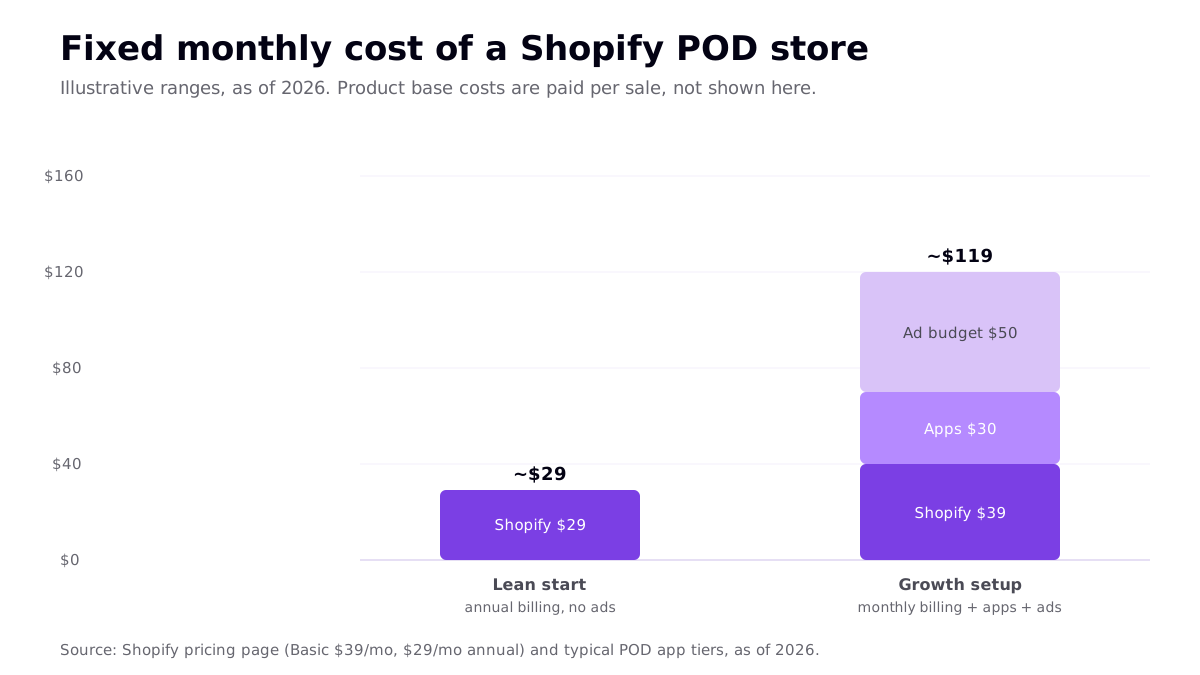
The costs split into two buckets: fixed monthly (predictable) and per-sale (paid only when money is coming in).
Fixed monthly costs
| Cost | Typical amount (2026) | Notes |
|---|---|---|
| Shopify Basic plan | $39/mo, or $29/mo annual | Cheapest full storefront; unlimited products |
| POD app | $0 | Printful, Printify, Gelato, Gooten install free |
| Optional apps | $0–30/mo | Reviews, upsells, email, design helpers |
| Starter ad budget | $0–50+/mo | Optional; needed if you rely on paid traffic |
Per-sale costs
- Product base cost — paid to your POD partner per order (a t-shirt is typically in the low teens).
- Payment processing — Shopify Payments charges 2.9% + $0.30 per online card sale on Basic. Using a third-party gateway adds a Shopify transaction fee on top.
- Shipping — charged by the partner; usually built into your retail price.
Choosing the best print on demand app for Shopify
The Shopify App Store lists 200+ POD apps, but a handful dominate. All four below install free and charge nothing monthly — you pay per order — so the real decision is about quality, catalog, base cost, and where your customers are.
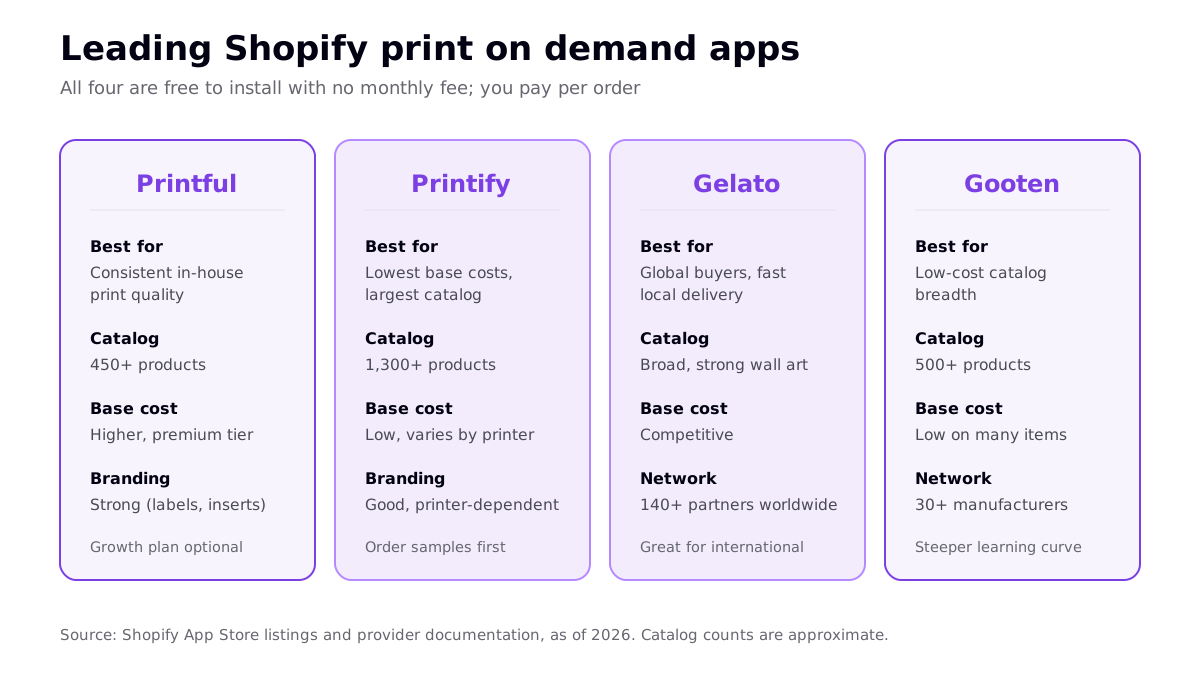
- Printful — best for consistent, in-house print quality and strong branding (custom labels, packaging inserts). Base costs run higher than marketplace-style providers. See our Printful review.
- Printify — the largest catalog (1,300+ products) and among the lowest base costs, since you pick from a network of print partners. Quality varies by partner, so order samples.
- Gelato — a global network of 140+ print partners producing near the customer, which is excellent for international buyers and wall art. See our Gelato review.
- Gooten — low-cost catalog breadth with a routing system that picks the best available partner per order. It has a steeper learning curve; see our Gooten review.
You are not locked in. Many sellers run Printify for apparel and Gelato for posters at the same time, publishing the same design wherever the economics are best.
How to launch a Shopify POD store step by step
- Start a Shopify trial and pick a plan. Basic is enough to launch.
- Choose a niche. Specific beats broad. "Trail-running gifts for dads" gives you keywords and design direction; "cool shirts" does not.
- Install a POD app from the Shopify App Store and connect it to your store.
- Create print-ready designs. If you generate art with AI, prepare files at the right resolution first — our 300 DPI guide covers it.
- Build products and set prices that cover base cost, payment fees, shipping, and your margin.
- Set up a clean theme and clear product pages, then order a sample of each product to verify quality.
- Drive traffic. Because Shopify has no built-in marketplace audience, plan for SEO, social content, or paid ads from day one.
Prefer WordPress over Shopify? The same model works there too — see our WooCommerce print on demand guide.
Shopify vs Etsy for print on demand
The most common question new sellers ask. The short version: Etsy hands you buyers but takes fees and control; Shopify hands you control but makes you find the buyers.
| Factor | Shopify | Etsy |
|---|---|---|
| Built-in traffic | None — you drive it | Yes — buyers already searching |
| Fees | Plan + payment processing | Listing + transaction + payment + optional ads |
| Branding & control | Full | Limited to Etsy's framework |
| Customer data | You own it | Etsy owns most of it |
| Best as | Your long-term home base | A fast validation channel |
A pragmatic path: validate designs on Etsy, then expand your winners to a Shopify store where the margins and brand equity compound.
Driving traffic to a Shopify POD store
The single hardest part of Shopify print on demand is not setup — it is getting visitors, because there is no built-in marketplace audience. Plan for at least one traffic channel before you launch, and lean into whichever fits your niche and budget:
- Content and SEO. Blog posts and well-optimized product pages that target buyer keywords pull free, compounding traffic over months. Slow to start, durable once it lands.
- Organic social. Short-form video and design showcases on the platforms where your niche already hangs out. Cheap, but demands consistent posting.
- Paid ads. The fastest way to test whether a product converts, but it eats into thin POD margins, so start small and only scale what is clearly profitable.
- Email. Capture emails from day one; repeat buyers are where POD stores become genuinely profitable.
Whichever channel you pick, treat your first batch of products as experiments. Track which designs get views and sales, double down on winners, and retire the rest. The compounding advantage goes to sellers who can test the most ideas per week — so keep design production fast and cheap.
Frequently asked questions
How much does Shopify print on demand cost per month?
The main fixed cost is your Shopify plan. The Basic plan is $39 per month, or $29 per month billed annually, as of 2026. Most POD apps are free to install with no monthly fee, though some add-ons cost $0 to $30 per month. You also pay Shopify Payments fees of 2.9% + $0.30 per online card sale on Basic. Product base costs are paid per order, only after a customer buys.
What is the best print on demand app for Shopify?
There is no single best app for everyone. Printful is the common pick for consistent in-house print quality and branding; Printify offers the largest catalog and lowest base costs; Gelato is strong for global buyers and wall art with local production; and Gooten offers low-cost catalog breadth. All are free to install, so many sellers test more than one and order samples before scaling.
Is Shopify or Etsy better for print on demand?
They solve different problems. Etsy brings built-in buyer traffic but charges per-sale fees and gives you less control. Shopify gives you full control over branding, data, and margins, but you must drive all your own traffic. Many sellers start on Etsy to validate designs, then expand proven products to a Shopify store.
Do you need inventory for Shopify print on demand?
No. That is the core advantage. You connect a print-on-demand app, and when a customer orders, the app forwards it to your fulfillment partner, which prints and ships the product directly. You never hold stock and only pay the base cost after the sale is made, keeping startup costs low.
Related reading
- WooCommerce Print on Demand: WordPress Guide
- Printful Print on Demand: Honest 2026 Review
- Print on Demand Dropshipping: 2026 Guide
- Best Print on Demand Sites Ranked for 2026